
 Alex Martin
An internal link strategy is simply the art of intentionally connecting pages on your own website to each other. For Divi and WooCommerce sites, this means building a smart network of links that steers both users and search engines toward your most important content. Done right, it distributes authority across your site and seriously boosts your SEO performance. A solid strategy turns a random collection of pages into a powerful, cohesive whole.
Why an Internal Link Strategy Is a Game Changer for Divi Sites
Let's get one thing straight: internal linking isn't just another tedious SEO task to check off your list. For anyone running a Divi or WooCommerce site, it's one of the most powerful levers you can pull to drive more traffic, guide users where you want them to go, and ultimately, increase sales.
A well-thought-out plan does way more than just help Google find your pages. It crafts a seamless user experience that keeps visitors clicking, exploring, and moving toward your conversion goals. This guide cuts through the jargon and gets straight to the practical side of things, showing you how to transform your site from a simple brochure into an authority-building machine.
The Real-World Impact on Traffic and Engagement
The difference between linking randomly and linking with a clear strategy is huge. I'm not just talking about a small bump in traffic. One groundbreaking study found that websites adopting a robust internal linking strategy saw their organic traffic explode by a whopping 40%.
That same analysis revealed that sites with intentional link hubs—think pillar pages linking out to related "cluster" content—didn't just get more traffic. They also saw a 25% drop in bounce rates because users were easily navigating between helpful, related resources.
This means your efforts directly translate into more visitors who stick around longer and discover more of what you have to offer. For a Divi site, that could be the difference between someone leaving after one blog post or finding their way to your flagship product page.
A well-planned internal link structure is the circulatory system of your website. It delivers vital 'link equity' to every corner of your site, ensuring that even your newer or less-visible pages get the nourishment they need to rank and perform.
Core Pillars of a Winning Strategy
A successful internal linking framework isn't complicated, but it does demand a focused approach. It’s really built on a few core principles that all work together to maximize your site's potential. These concepts are the foundation for everything we'll dive into, from planning your site's architecture to using specific Divi module tricks.
Here’s a quick overview of the essential components we'll cover, helping you grasp the key concepts from the start.
Core Pillars of an Effective Internal Link Strategy
| Pillar | Objective | Key Action |
|---|---|---|
| Site Architecture | Establish a clear hierarchy. | Plan and build topic clusters around pillar pages to organize content logically. |
| Link Equity Flow | Distribute authority effectively. | Link from high-authority pages to important, underperforming pages. |
| User Experience | Guide visitors to relevant content. | Use contextual links with descriptive anchor text to create a natural journey. |
| Crawlability | Help search engines find all pages. | Ensure every valuable page has at least one internal link pointing to it. |
By mastering these elements, you're not just checking an SEO box; you're building a stronger, more effective digital asset. For more foundational SEO tips, check out the ultimate guide to ranking your Divi website.
Building Your Site Architecture with Pillar Pages
Alright, let's move from theory to action. This is where a killer internal linking strategy really starts to come together. The absolute bedrock of this strategy is your site architecture, and the most effective way I've found to build a logical, SEO-friendly structure is the pillar-cluster model.
Think of it like building a well-organized library. Your pillar page is the main, definitive guide on a broad topic that's central to what you do. For a Divi agency, a great pillar page could be "Divi Performance Optimization." If you're running a WooCommerce store, something like "WooCommerce Conversion Funnels" would be perfect. These pages are your central hubs, targeting high-level keywords and giving a solid, comprehensive overview.
From that main hub, you build out your topic clusters. These are much more specific articles that dive deep into all the subtopics related to your pillar. Critically, each of these cluster pages links back up to the main pillar. This sends a crystal-clear signal to search engines that your pillar page is the go-to authority on that subject. For a deeper dive, check out this excellent guide on mastering site architecture SEO.
The diagram below really brings this to life, showing how a solid strategy is the starting point for real-world results like traffic, better user engagement, and ultimately, more sales.
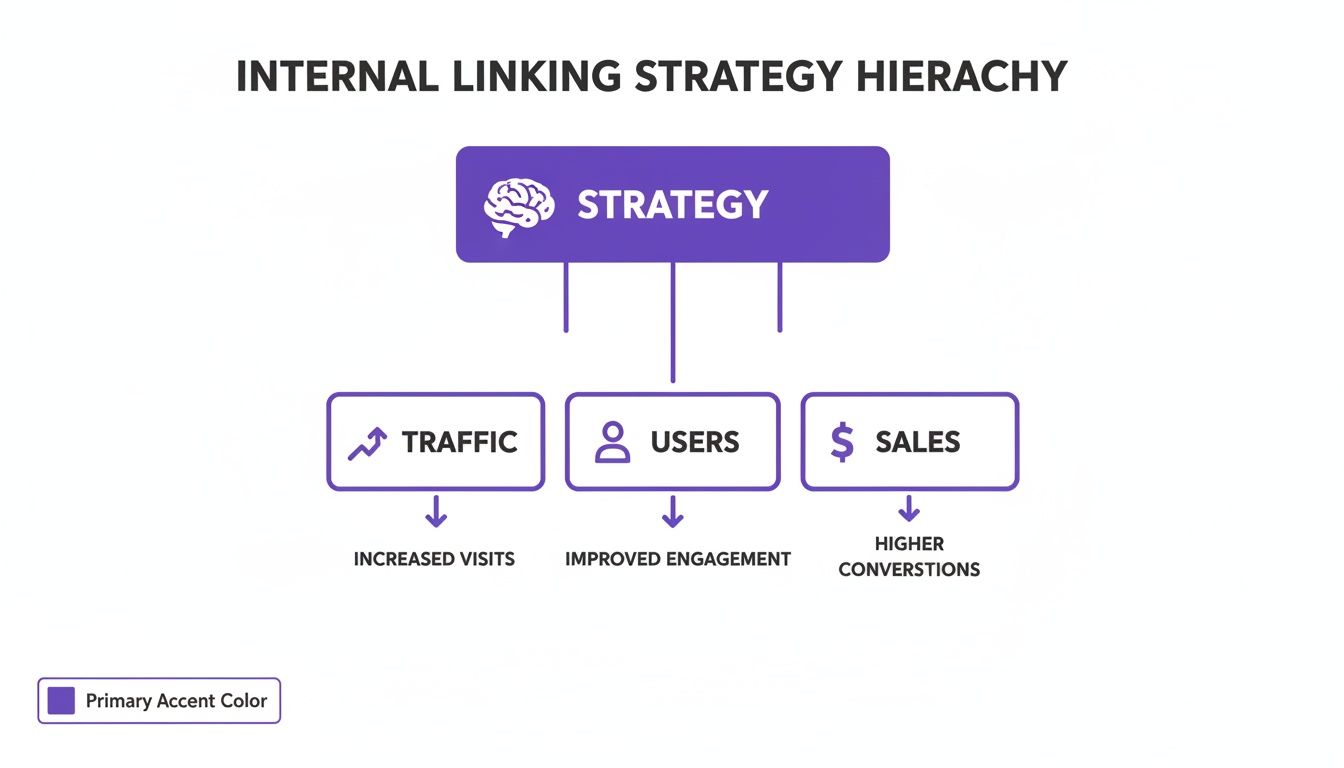
As you can see, your planning efforts aren't just busywork; they're directly connected to growing your website.
Identifying Your Core Pillar Topics
First thing's first: you need to figure out what core topics you want to own. Don't overthink this. What are the biggest problems you solve for your customers? What are your main services? Those are your pillar page ideas right there.
Here are a few real-world examples:
- For a Divi Freelancer: Your pillars could easily be "Custom Divi Web Design," "Divi Maintenance Plans," and "Divi Theme Customization." These are your bread-and-butter services.
- For an Ecommerce Manager: Think about pillars like "Seasonal Marketing for WooCommerce," "Product Page Optimization," or "Customer Retention Strategies."
- For a Plugin Developer: A pillar page like "Getting Started with Divi Areas Pro" is a no-brainer. It becomes the central resource for every feature, tutorial, and guide related to the plugin.
Once you’ve nailed down your 3-5 main pillar topics, you can start brainstorming the cluster content that will prop them up. This process is absolutely key for building a content marketing funnel that actually works. If you want to see how this ties together, we have a guide on how to create a content marketing funnel with Divi.
Brainstorming and Mapping Cluster Content
Now for the fun part—mapping out all your cluster content. Take each pillar topic and just list out every single subtopic you could possibly write about. Think tutorials, deep dives into specific features, case studies, comparison posts, and listicles.
Let’s stick with a Divi example. Imagine your pillar page is "The Ultimate Guide to Divi Popups."
Your cluster content could branch out into things like:
- A detailed tutorial on "How to Create an Exit-Intent Popup with Divi Areas Pro."
- A case study showing "How We Increased Sign-Ups by 35% with Scroll-Triggered Fly-Ins."
- A practical guide on "A/B Testing Popup Designs for Maximum Conversions."
- A feature breakdown on "Using Back-Button Detection for Special Offers."
Each of these posts would offer specific, valuable information. And here’s the crucial part: every single one of them would link back to your main "Ultimate Guide to Divi Popups" pillar page. This creates a powerful, interconnected web of content that screams authority on the topic.
When you organize your content this way, you're doing more than just helping users find what they need. You are explicitly telling Google, "Hey, this pillar page is the most important resource on this topic, and all these other pages prove it." This intentional structure is what drives rankings.
This organized method also prevents you from creating "orphaned pages"—content with no internal links pointing to it, making it pretty much invisible to search engines. It ensures every single piece of content you create has a clear purpose and a home within your site's hierarchy, maximizing its SEO value from the moment you hit publish.
Getting Anchor Text and Link Placement Right for Maximum Impact
Once you’ve got your site architecture mapped out, the real magic happens in the details—specifically, the anchor text you choose and where you place your links. Believe me, not all links are created equal. Mastering these two elements can seriously amplify their SEO power.
Anchor text is simply the clickable text in a hyperlink. It’s a huge contextual signal for both users and search engines, telling them exactly what the destination page is about. Since you have total control over this on your own site, it's a golden opportunity you can't afford to waste.
Think about it: generic anchor text like "click here" or "read more" offers almost zero SEO value. On the other hand, descriptive text gives Google a clear roadmap to understanding your content.

Choosing the Right Anchor Text
The key here is to aim for a healthy, natural mix of anchor text types. If you overuse one type, especially exact-match, search engines might see it as a manipulative tactic. You want to look authentic.
Here’s a breakdown of the main types, with some real-world Divi examples:
- Exact-Match: The anchor text is the exact target keyword of the page you're linking to. Use this sparingly, but when you do, make it count. For instance, linking the phrase "Divi mega menus" directly to your pillar page on that very topic.
- Partial-Match: This is where the anchor text includes a variation of your keyword. It's a much safer and highly effective approach. For example, linking "our advanced popup plugin" to your Divi Areas Pro product page.
- Branded: The anchor text is just your brand or product name. This is perfect for linking back to your homepage or core product pages. Think of using "Divi Areas Pro" as the link.
- Generic: This is your non-descriptive text like "learn more." These are fine for clear calls to action, but don't count on them to pass any meaningful SEO context.
By mixing things up, you create a linking pattern that feels natural and genuine, which is exactly what search engines reward.
Placing Your Links Where They Matter Most
Where a link appears on a page also changes its weight. Links embedded within the main body of your content, often called contextual links, carry the most SEO juice. Search engines give these more importance because the surrounding text provides valuable context.
Links placed higher up in the content are also generally seen as more significant. Why? Because users are more likely to see them and click on them. A link in the first paragraph is almost always more powerful than one tucked away in the footer.
Don't underestimate the power of placement. A single, well-placed contextual link in the opening paragraph of a high-authority blog post can pass more meaningful equity than dozens of links hidden in a site-wide footer. Always prioritize links that genuinely help the reader.
For your Divi site, this means putting a heavy emphasis on contextual links within your blog posts, tutorials, and service pages. For instance, if you're writing about common Divi issues, a link to a guide on how to fix an anchor link target hidden behind Divi's sticky menu would be a perfectly placed, genuinely helpful resource.
This approach ensures you're not just dropping links for the sake of it. You're actively "sculpting" the flow of authority and guiding user attention toward your most important pages. The goal is always a smart balance between link quantity and link quality.
Going Deeper: Advanced Linking for Divi and WooCommerce
Once you get comfortable with basic internal linking, you can start leveraging the tools inside Divi and WooCommerce to build a much smarter network of connections. We're moving beyond simple text links here. The goal is to create a dynamic system that guides users and spreads link equity in a far more sophisticated way.
Let's dive into how you can use Divi's own features to build a superior linking framework.
Weaving Links into Your Divi Modules
Every single module in Divi is an internal linking opportunity waiting to happen. Most people stop at the standard Text module, but thinking bigger unlocks so much more potential for directing users and authority.
- Blurb Modules: Don't just link the title. Use the module's built-in "Link" option to make the entire blurb—icon, title, and text—a single, clickable element. This is a visually compelling way to funnel users from a pillar page to its supporting cluster content.
- Call to Action Modules: The button in a CTA is an obvious link, but it's often used inconsistently. My advice? Use Divi's Global Presets. Create a standardized "Read Next" or "Explore This Feature" button style. This ensures your most important internal links are always prominent and recognizable.
- Image Modules: It’s easy to forget that images make for powerful internal links. When you're showcasing a product feature or a compelling case study graphic, link that image directly to the relevant product page or detailed blog post. A strong visual cue can seriously boost click-through rates.
When you start seeing your entire Divi layout as a canvas for your internal linking strategy, you create a much richer and more effective user journey.
Building Powerful Mega Menus
A simple dropdown menu gets the job done, but a Divi mega menu is a strategic powerhouse. Mega menus give you the space to display a whole set of organized links, often broken down by subheadings and decorated with images or icons. This is your chance to send users—and link equity—straight to your most important pillar pages and even key cluster articles, right from your main navigation.
Think beyond a basic "Services" dropdown. A mega menu can showcase each service with a short description and a direct link. You've just created multiple high-value internal links that are accessible from every single page on your site.
Creating Smarter Links with Divi Areas Pro
This is where things get really interesting. A link is most powerful when it appears at the exact moment a user needs it. Using a tool like Divi Areas Pro, you can trigger popups, fly-ins, or content sections based on specific user actions.
Imagine a user is reading your blog post on "how to improve website conversion rates." You can set up a Divi Area to trigger once they've scrolled 50% down the page. This popup could then offer a perfectly timed, contextual link to your ultimate guide on "A/B Testing with Divi"—presenting the logical next step in their journey. It's brilliant.
The level of control is incredible. You can target specific posts, categories, or even user roles, allowing you to craft an internal linking strategy that responds directly to what the user is doing.
By triggering contextual popups or fly-ins, you're not just adding a link; you're creating an interactive pathway. This transforms a static page into a dynamic experience, guiding users from general interest to deep engagement with your most valuable content.
Smart Linking for Your WooCommerce Store
For any WooCommerce site, a smart internal link strategy is non-negotiable. It's crucial for both SEO and sales. The main goals are to make your product catalog easier for Google to crawl while simultaneously nudging that average order value up.
Here are a few tactics that have worked wonders for me:
- Link from Product Descriptions: Inside your product descriptions, link out to related products, must-have accessories, or even blog posts that show the product in action. A description for a new camera, for example, could link to a compatible lens and a tutorial on "night photography basics."
- Interlink Your Category Pages: Your category pages are critical hubs. Beef them up with sections for "Top Selling Products" or "Related Categories." This creates a dense web of links that helps both users and search engines discover the full scope of your inventory.
- Bridge the Gap Between Content and Commerce: Write blog posts that solve the exact problems your products address. A post on "10 Ways to Organize Your Home Office" is the perfect place to naturally link to your desk organizers, cable management solutions, and shelving units. You provide value first, then seamlessly guide readers toward a relevant purchase.
Auditing and Measuring Your Internal Linking Success
An internal linking strategy is just a nice idea until you can actually tell if it’s working. Setting up your pillar pages and dropping in contextual links is only half the job; the real progress happens when you regularly audit your site and measure the results. This is how you turn good intentions into tangible SEO gains.
If you skip this feedback loop, you’re basically flying blind. You won’t know which pages need more support, where your link equity is being wasted, or if your hard work is actually moving the needle on your rankings and traffic.
Kicking Off Your Internal Link Audit
First thing’s first: you need a clear picture of your current linking landscape. A great starting point is a free tool you already have access to—Google Search Console. Head over to the "Links" report. It will show you which of your pages have the most (and fewest) internal links, giving you an immediate hit list of under-loved content that needs attention.
For a much deeper dive, you'll want to fire up a dedicated crawling tool. Tools like Screaming Frog (which has a free version for smaller sites) or Ahrefs’ Site Audit can crawl your entire website just like Googlebot does. They spit out a ton of data, helping you visualize your site structure, analyze your anchor text distribution, and, most importantly, find critical errors.
Auditing isn't a one-time task. It's an ongoing process of refinement. Think of it like tuning an instrument—small, regular adjustments ensure your entire internal link strategy stays in perfect harmony and continues to deliver results over time.
One of the most common and damaging issues these tools uncover is orphaned pages. These are pages with zero internal links pointing to them, making them virtually invisible to both search engines and users. A key part of your audit is to hunt these down and integrate them into your site, as this practical guide on fixing orphan pages explains.
Key Metrics That Actually Matter
Once you have your baseline data, you need to know what to watch. Forget vanity metrics; focus on the numbers that directly reflect the success of your internal linking.
Here are the primary metrics I always monitor:
- Organic Keyword Rankings: Are your target pages climbing the SERPs for their primary keywords? This is the most direct indicator that your strategy is working.
- Pages Per Session: Is this number going up? A higher pages-per-session metric is a strong signal that your internal links are successfully guiding users deeper into your site.
- Indexed Pages: Pop into Google Search Console and see if more of your pages are getting indexed, especially after you’ve fixed orphaned content. A healthy link structure makes it easier for Google to discover and index your entire site.
- Bounce Rate: While not a direct ranking factor, a lower bounce rate can indicate that your contextual links are engaging visitors and encouraging them to stick around.
Analyzing Your Anchor Text Profile
A proper audit goes beyond just counting links; it means digging into the kind of anchor text you're using. Your crawling tool should give you a full report on anchor text distribution. Are you leaning too heavily on exact-match anchors? Is your anchor text varied and natural-sounding?
This is more critical than you might think. Recent research shows that 60% of top-ranking pages use contextual internal links woven naturally into the content.
For Divi creators, a well-placed, descriptive link like "boost conversions with back-button detection in Divi Areas Pro" from a tutorial can be incredibly effective. This aligns with findings that link anchor text variety is strongly correlated with traffic spikes, while relying on exact-match anchors alone can be up to 5x less effective.
Common Questions About Internal Linking for Divi Sites
An internal linking strategy always brings up questions, especially when you're working inside the Divi ecosystem. Getting the details right is what separates a good strategy from a truly great one, so let’s dig into some of the most common questions Divi and WooCommerce users run into.
Think of this as your quick-reference guide. It's packed with direct, actionable answers to help you fine-tune your approach, get past any sticking points, and build out your internal links with total confidence.
How Many Internal Links Should I Add to a Page?
There’s no magic number here, but we definitely have enough data to point you in the right direction. While some studies suggest pages with just 3-5 highly relevant internal links perform best, that's not a hard-and-fast rule you need to live by. The real answer always comes down to the content itself.
As a solid starting point for a typical 1500-word blog post on your Divi site, aiming for 5-10 high-quality internal links is a fantastic goal. A longer, more in-depth pillar page could easily have double that, and it would make perfect sense.
The golden rule? Prioritize user value above all else. If adding a link genuinely helps the reader find more information or take the next logical step, do it. Never force links just to hit some arbitrary quota—focus on relevance and creating a natural, helpful user flow.
Should My Internal Links Be Dofollow or Nofollow?
This is a really common point of confusion, but thankfully, the answer is incredibly straightforward. By default, every single link you create in WordPress is "dofollow." This is exactly what you want.
That "dofollow" attribute is the engine that makes your entire internal linking strategy work. It’s what passes authority (often called "link equity") between your pages, telling search engines how your content is connected and which pages are most important. A "nofollow" tag does the opposite; it tells search engines not to pass any authority, effectively creating a dead end.
You should almost never use "nofollow" on your internal links. The only rare exceptions might be for links to pages you don't care about from an SEO perspective, like a private login page or an internal search results page. For all your content, products, and pillar pages, stick with the default dofollow links.
How Do I Find and Fix Orphaned Pages?
Orphaned pages are URLs with zero internal links pointing to them. This makes them almost invisible to both your visitors and search engine crawlers. Hunting them down is a critical maintenance task for any healthy website.
The most efficient way to do this is with an SEO crawling tool. A few of my go-to options are:
- Screaming Frog: The free version crawls up to 500 URLs, which is perfect for smaller Divi sites.
- Ahrefs' Site Audit: Provides a comprehensive report that specifically flags orphaned pages, making them easy to spot.
- SEMrush's Site Audit: Another powerhouse tool that will quickly identify any pages that are missing incoming internal links.
Once you run a crawl, the tool will spit out a list of all your orphaned pages. The fix is usually simple: find relevant, high-traffic pages on your site and add contextual links to these forgotten URLs. For instance, if you find an orphaned post about "email popup design," you could easily link to it from your main pillar page on "Divi Popups."
Can I Use an AI Tool to Automate Internal Linking?
Yes, and I'd argue you probably should—as long as you treat AI as an assistant, not as a replacement for your own strategy.
AI-powered plugins like Link Whisper can be incredible time-savers. They scan your content and suggest dozens of relevant internal linking opportunities you might have missed. These tools are fantastic at finding contextual linking chances buried deep within your existing articles.
However, it's absolutely crucial that you always review their suggestions before just clicking "accept." AI is great at pattern matching, but it doesn't fully grasp the subtle nuances of user intent or your specific pillar-cluster goals.
My advice? Use AI to handle the tedious work of finding potential links. Then, apply your own human expertise to approve and place the ones that are genuinely helpful and align perfectly with your strategy. It’s the best of both worlds: the speed of automation paired with the precision of a human strategist.
Ready to build a smarter, more interactive website? At Divimode, we create the tools you need to turn your internal link strategy into a dynamic user experience. With Divi Areas Pro, you can create perfectly timed popups and fly-ins that present the right links at the right moment, guiding your visitors and boosting conversions. Discover what's possible at https://divimode.com.
More Articles You Will Like





