 Alex Martin
It's tempting to dive straight into installing plugins when you decide to build a membership site. We've all been there. But trust me, that's one of the most common mistakes I see people make. A rock-solid plan is your most valuable asset, turning a vague idea into a real, profitable business.
This initial planning phase isn't about code or Divi modules; it's about getting crystal clear on your vision. The goal here is to define exactly what you're selling, who you're selling it to, and why they should care enough to pay for it.
Without this blueprint, you risk building a beautiful, feature-packed site that nobody actually joins. Think of it like building a house: you wouldn't just start nailing boards together without architectural drawings. Your plan ensures every plugin choice, page design, and piece of content serves a single, unified purpose.
Define Your Core Offer and Ideal Member
First things first, who is this for? Pinpoint your ideal member. What problems are they desperately trying to solve? A freelance graphic designer struggling to find clients has entirely different needs than a hobbyist baker who wants to master advanced recipes.
Get specific. Create a simple persona. What’s their current skill level? What are their biggest frustrations? What does success look like for them?
Once you know your audience inside and out, you can shape your core offer—the exclusive value they get in exchange for that subscription fee. This usually falls into a few key categories:
- Exclusive Content: This could be anything from advanced Divi tutorials and premium design templates to in-depth case studies or a library of downloadable assets. The key is that it's high-value stuff they can't get for free anywhere else.
- Community Access: Many of the most successful membership sites are really selling connection. A private forum, a lively Slack channel, or monthly group coaching calls can be far more valuable than the content itself. It offers a space for members to network, get feedback, and feel like they belong.
- Services or Coaching: Your membership could be a gateway to direct access to you. Think monthly one-on-one strategy sessions, design critiques, or priority support that puts them at the front of the line.
This simple flow shows how these pieces fit together. You start with a solid plan, create compelling content that speaks directly to that plan, and then build the technical structure to deliver it all.
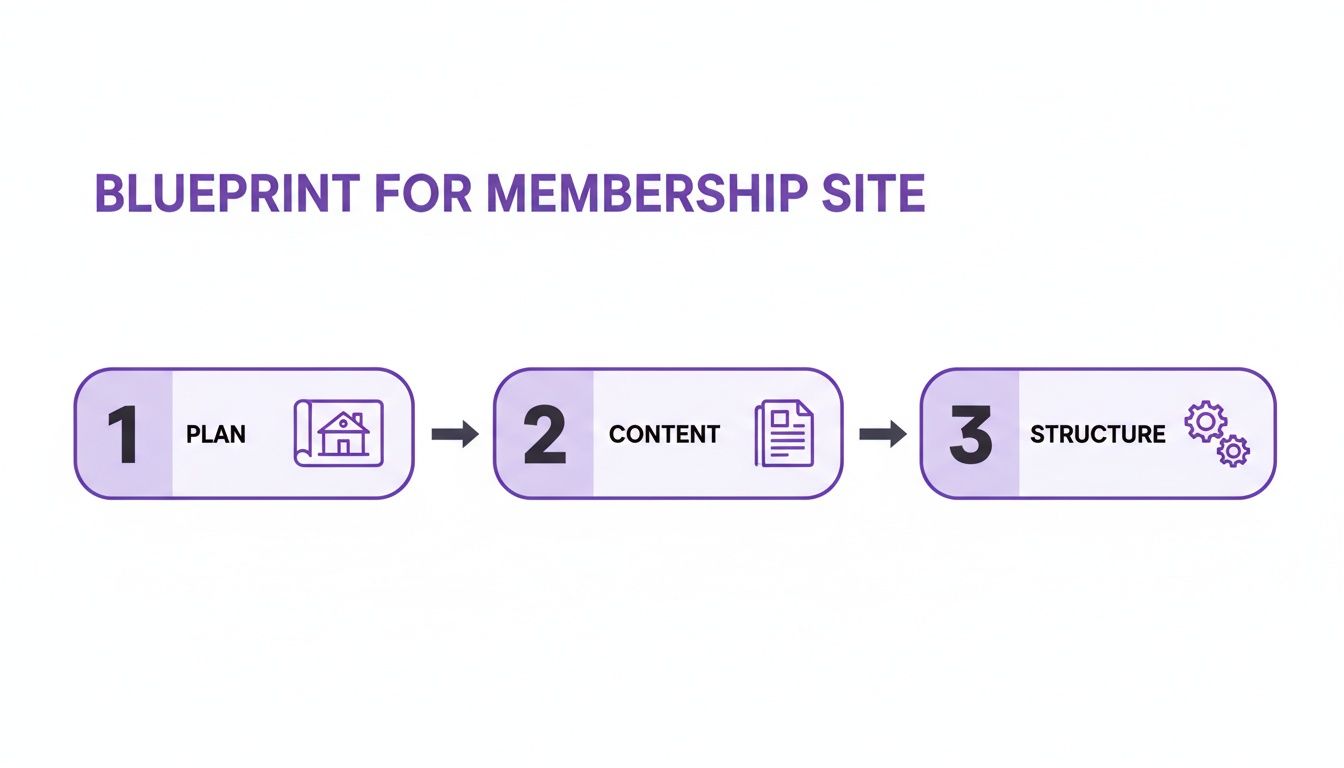
Each step builds directly on the last, ensuring your final site isn't just a collection of pages, but a focused machine built to serve your members' needs.
Choose Your Membership Model
With your "what" and "who" figured out, it's time to decide on the "how." The model you choose will shape everything from member engagement to your own administrative workload. The global subscription economy is projected to hit $722 billion by 2025, but that success is built on a smooth user experience. This is especially true for payments; over 60% of consumers will ditch a purchase because of payment glitches, which is a killer for any recurring revenue model.
So, how will you structure your membership? Your choice will directly impact how your members experience your site and how you manage your content. Here’s a quick breakdown to help you find the right fit.
Choosing Your Core Membership Model
A comparison of the three primary membership models to help you decide which structure best fits your content and business goals.
| Model Type | Best For | Key Challenge | Divi Plugin Synergy |
|---|---|---|---|
| All-Access Pass | Large libraries of resources, tools, or evergreen content where users want to jump around freely. | Keeping content fresh and valuable enough to prevent members from binging and canceling. | Excellent with a simple membership plugin paired with Divi Areas Pro for targeted upsell popups. |
| Tiered Model | Offerings with clear value levels, like courses plus a community, or a basic vs. premium toolset. | Clearly communicating the value of each tier without devaluing the lower ones. | Works well with MemberPress or Restrict Content Pro to manage complex access rules for different Divi layouts. |
| "Drip" Content | Structured courses, training programs, or sequential content that needs to be consumed in order. | Maintaining engagement over the long term and preventing users from getting bored between content drops. | Pairs perfectly with LearnDash and Divi Areas Pro to show conditional messages or bonuses as users progress. |
Ultimately, the right model comes down to your content and your members' goals. A fixed-term course is a natural fit for the drip model, while a massive resource library is perfect for an all-access pass.
For a deeper dive into making your platform as effective as possible, it's worth checking out some broader strategies on how to build a membership website for maximum business leverage. With your member, offer, and model now defined, you finally have the blueprint you need to start building with confidence.
Assembling Your Divi Membership Tech Stack
With your membership blueprint finalized, it's time to choose the tools that will bring your vision to life. Building a successful Divi membership site depends on a smart combination of a core membership plugin and dynamic tools that create a seamless user experience. Think of your tech stack as the engine of your site, handling everything from content protection to member engagement.
Selecting the right plugins isn't just a technical decision; it directly impacts your ability to convert visitors and retain members. The goal is to create a system that feels powerful, scalable, and completely native to the Divi Builder.
Choosing Your Core Membership Plugin
Your first major decision is the core membership plugin. This is the foundation for managing subscriptions, restricting content, and processing payments. While there are many options out there, two stand out for their rock-solid integration with WordPress and Divi.
- MemberPress: A fantastic all-in-one solution known for its power and relative ease of use. It handles content dripping, tiered memberships, and payment gateway integrations flawlessly. Its rules-based system for content restriction is intuitive and works well for protecting entire pages or specific post types built with Divi.
- WooCommerce Memberships: If your site already uses or plans to use WooCommerce to sell products, this is a natural choice. It integrates directly into your existing store, letting you tie memberships to product purchases or sell them as standalone subscriptions. This is perfect if you want to offer member-only products or special discounts.
Your choice here really depends on your business model. For a straightforward content or community site, MemberPress is often the quicker path. For a more complex e-commerce and membership hybrid, WooCommerce Memberships provides unmatched integration.
Supercharging the Experience with Divimode
A core membership plugin handles the backend logic, but creating a truly dynamic and engaging frontend experience is where Divimode's tools shine. This is how you move from a basic gated site to an interactive platform that anticipates member needs. Divi Areas Pro is the key to unlocking this potential.
This powerful plugin allows you to display any piece of Divi content—a section, row, or module—anywhere on your site based on specific conditions. This goes far beyond simple content restriction. For a membership site, this means you can show targeted messages, upsell offers, and personalized content based on a user’s role, membership level, or even their actions on the site.
The Divi Areas Pro interface is incredibly intuitive, letting you configure triggers and visibility rules for all your dynamic content.

This screenshot gives you a glimpse of the flexibility you have to control exactly who sees what and when—the cornerstone of a personalized member experience.
Pro Tip: Don't just hide content from non-members—replace it. Use Divi Areas Pro to show a beautifully designed "Join Now" call-to-action right where your premium content would be. This turns every restricted page into a high-conversion landing page.
Here are a few practical ways I've used Divi Areas Pro on membership sites:
- Targeted Upsell Popups: Display an exit-intent popup offering a discount on your annual plan, but only to members currently on a monthly plan.
- Member-Only Navigation: Create a custom menu item in your main navigation that only appears for logged-in premium members, linking them to an exclusive resource hub.
- Dynamic Welcome Messages: Inject a personalized welcome banner into the Divi header for first-time visitors who just signed up, guiding them on their next steps.
Growing Your Funnel with Popups for Divi
Before someone can become a member, they need to join your audience. This is where the free Popups for Divi plugin becomes an essential part of your tech stack. It’s a lightweight yet surprisingly powerful tool for lead generation.
You can use it to create simple, effective popups that offer a lead magnet—like a free checklist or mini-course—in exchange for an email address. This builds your mailing list with qualified prospects who are already interested in your topic. Once they're on your list, you can nurture them with valuable content and eventually guide them toward a paid membership.
By thoughtfully combining a core plugin like MemberPress with the dynamic capabilities of Divi Areas Pro and the lead-gen power of Popups for Divi, you assemble a tech stack that’s perfectly equipped to build, manage, and grow a thriving membership community.
Alright, you've got your tech stack picked out. Now it’s time to roll up your sleeves and start the actual construction. This is the fun part, where you’ll turn that membership blueprint into real, tangible pages and, most importantly, secure the premium content your members will be paying for.
We'll start by building out the essential pages your users will interact with using the Divi Builder. Then, we’ll get into the nitty-gritty of content protection.
The idea isn't just to lock things down. It's about crafting an experience that feels seamless for members while giving non-members a strategic peek at what they're missing—enough to entice them to sign up. When done right, your protected site feels exclusive and valuable, reinforcing their decision to join.

Designing Your Essential Membership Pages
Before you can protect anything, you need the core pages that guide the member journey. Your chosen membership plugin (like MemberPress) will often spit out basic versions of these, but that's just a starting point. Your job is to jump into the Divi Builder and style them so they feel like a cohesive part of your brand.
Here are the non-negotiable pages you'll need to design:
- Registration Page: Keep this form clean and simple. Ask only for what you absolutely need to reduce friction. Use Divi’s design controls to style the form fields, buttons, and surrounding text to look professional and inviting.
- Login Page: Nothing screams "amateur" like the default WordPress login page. A custom, branded login page is a must. Design something simple that makes it dead easy for members to get into their accounts.
- Account Dashboard: This is your member's home base. It should give them quick access to their profile, billing info, subscription status, and, of course, direct links to all the exclusive content they've paid for.
- Pricing Page: Create a clear, compelling pricing table that spells out the benefits of each tier. I highly recommend using Divi's toggle or tab modules to compare monthly vs. annual pricing. Offering a discount for yearly plans is a fantastic way to boost your upfront cash flow.
Implementing Granular Content Protection
With your core pages looking sharp, it's time to implement the real power move: robust content protection. This is where knowing how to build membership site access rules becomes absolutely critical. Your membership plugin will handle the broad strokes, like restricting an entire page to a specific membership level. Easy enough.
But the real magic for us Divi users happens when you layer that with the fine-tuned control of a tool like Divi Areas Pro. This combo lets you protect content at a much more granular level.
Instead of just slapping up a generic "access denied" message, you can control the user experience with surgical precision. This turns what would be a frustrating dead-end into a powerful conversion opportunity.
Imagine you have a premium video course. A non-member might land on the lesson page, but they won't see the video player. Instead, using Divi Areas Pro, you can display a beautifully designed call-to-action that says, "This video is for Gold Members. Upgrade now to unlock this lesson and 50+ more!"
Applying Divi-Specific Access Rules
The true flexibility comes from applying these access rules right inside the Divi Builder, letting you create dynamic layouts that change based on who’s looking at them.
Here are a few practical scenarios I’ve used in my own projects:
- Protecting a single module: Let’s say you have a blog post with a mix of free and premium content. You can make a specific Divi Text module—the one containing a downloadable PDF link—visible only to "Premium" members. The rest of the page remains visible to everyone.
- Displaying an upsell in a specific section: On your main course page, you could add a section at the bottom that only appears for "Silver" members, prompting them to upgrade to the "Gold" tier to get bonus materials.
- Hiding sidebar widgets: You can create a custom sidebar in the Divi Theme Builder that shows a special "Member Events" calendar, but then set its visibility conditions so only logged-in members ever see it.
This level of control is achieved by integrating your membership plugin's roles with the visibility conditions in Divi Areas Pro. For a deeper dive into the mechanics, you can learn more about how to display content using Divi Areas Pro based on user roles and other conditions. It's how you craft a truly dynamic and personalized experience for every single user, member or not.
Crafting an Unforgettable Member Onboarding Experience
Getting a new member to sign up is just the finish line for the acquisition race. The real marathon—the one that builds a sustainable business—is retention. Those first few hours and days after someone joins are absolutely critical. This is your one shot to make a stellar first impression, prove they made the right choice, and hook them for the long haul.
A proactive onboarding strategy isn't just a "nice-to-have." It’s an essential part of delivering on the value you promised from day one. If a new member feels lost or overwhelmed right at the start, they're the most likely to disappear forever. Your job is to smooth out that initial friction and guide them straight to the good stuff.

Designing Your Automated Onboarding Sequence
A great onboarding experience feels personal, but it must be automated if you want to scale. This sequence should kick in the moment a user finishes registration, starting with a warm welcome and walking them through their first key actions.
The cornerstone here is a personalized welcome email. Please, go beyond the default "Your account is active" message. This email needs to do more work. It should:
- Reinforce the value: Briefly remind them of the awesome benefits they just unlocked.
- Provide a clear next step: Give them a big, obvious button that says "Log In and Get Started" or "Explore Your Dashboard."
- Set expectations: Let them know what's coming next, like a follow-up email with a few quick tips.
This first email is your opening move in building a real relationship. Make it count.
Creating a Guided Tour with Divi Areas Pro
Once they log in for the first time, don't just dump them onto a generic dashboard. This is a perfect opportunity to use Divi Areas Pro to create an interactive, guided tour that feels incredibly premium. By setting up a series of popups or fly-ins that trigger only on "first login," you can walk new members through the most important parts of their account.
Your goal during onboarding is to get them to that "user activation" moment as quickly as possible. This means guiding the member to the core feature or piece of content that delivers the 'aha!' moment—the point where they truly get why their membership is so valuable.
For instance, your Divi Areas Pro sequence could look something like this:
- Welcome Popup: A full-screen welcome message that greets them by name.
- Feature Highlight: A small tooltip appears, pointing to the "Courses" section in the menu and explaining what they'll find.
- Community Intro: Another fly-in highlights the community forum, nudging them to pop in and introduce themselves.
- Final CTA: A final popup suggests a "quick win," like watching a 5-minute intro video or downloading their first resource.
This kind of step-by-step guidance prevents that initial overwhelm and makes sure they discover the key features that will keep them coming back.
Strategies for Ongoing Engagement and Retention
Onboarding doesn't stop after day one. The first 90 days are crucial for forming long-term habits. This is where dripping your content becomes such a powerful retention tool. Instead of unlocking your entire library at once, you can release new lessons, modules, or resources on a set schedule. It keeps members engaged and creates a natural sense of anticipation.
The financial incentive for getting this right is massive. It's way cheaper to keep a member than to find a new one. With median renewal rates hovering around 84%, delivering continuous value is the key to profitability. However, members who tune out in their first 90 days are 73% more likely to churn. Innovators who use new methods to deliver content consistently see better growth and are far more likely to hit that renewal gold standard.
To really nail the start of their journey, dig into these essential customer onboarding best practices to boost user activation and cut down on churn.
Ultimately, a thoughtful onboarding experience shows members you're invested in their success. It turns a simple transaction into the beginning of a valuable relationship and lays the foundation for long-term loyalty. For more ideas on structuring this initial phase, check out our guide on client onboarding best practices; you'll find that many of the same principles apply.
5. Get Your Payment and Subscription Systems Dialed In
A clunky, unreliable payment process is the fastest way to kill a membership site. This is the moment a visitor officially decides to trust you with their money, and it's the engine that keeps your recurring revenue coming in. If it's confusing or breaks, you don't just lose a sale—you lose a member, maybe for good.
While your membership plugin (like MemberPress or WooCommerce Memberships) will do most of the heavy lifting, your job is to make the whole experience feel invisible and build a safety net for when things inevitably go wrong.
Integrating Your Payment Gateways
First things first, you need to connect your site to payment processors people actually trust. For 99% of sites, that means setting up both Stripe and PayPal. Together, they cover almost everyone's preference and bring rock-solid security to the table, which is non-negotiable for building trust.
You'll find a dedicated "Payments" or "Gateway" section inside your membership plugin's settings. The process is usually pretty straightforward:
- Set up business accounts: If you haven’t already, get your business accounts squared away with Stripe and PayPal.
- Find your API keys: Each service provides API keys (usually a "publishable" key and a "secret" key). Think of these as the secure handshake between their platform and your website.
- Plug them into your plugin: Just copy and paste these keys into the right fields in your plugin’s payment settings.
With that connection made, you can start building out your subscription plans—defining your pricing tiers, setting up billing cycles (monthly vs. annually), and maybe offering a free trial to get people in the door.
Pro Tip: Never, ever launch without testing your payment process in "sandbox mode." This lets you run through the entire signup flow using a fake credit card to make sure every step works flawlessly. A single payment glitch on launch day can seriously damage your reputation before you even get started.
If you're looking to explore other payment options, our guide on the best payment plugins for WordPress is a fantastic place to start.
Tackling Failed Payments and Involuntary Churn
Here's a tough reality of the subscription world: a huge chunk of your churn won't come from people actively canceling. It'll be involuntary churn—revenue that slips through the cracks because of expired credit cards, bank declines, or other random payment failures.
This is where a solid dunning management system comes in. "Dunning" is just a fancy word for the process of automatically following up with customers when a payment fails. Most premium membership plugins have this built right in. You can create a simple automated email sequence that kicks in the moment a recurring payment doesn't go through.
A simple, effective dunning sequence might look something like this:
- Email 1 (Immediately): A friendly, no-panic heads-up. "Hey [Name], we had a little trouble processing your payment. You can update your details here to keep your access."
- Email 2 (3 days later): A bit more direct. "Just a quick reminder to update your payment info. Your access will be paused in 4 days if we can't get this sorted."
- Email 3 (7 days later): The final notice before you have to suspend or cancel their account.
You’d be shocked at how much revenue this simple, automated process can recover all on its own.
Using Divi Areas Pro for Proactive Recovery
But why wait for a payment to actually fail? This is where you can get really smart with Divi Areas Pro. By connecting it to your membership plugin, you can create a trigger that proactively warns users when their payment method is about to expire.
Imagine this: a member logs in and a clean, non-annoying fly-in box appears in the corner. It says something like, "Heads up! Your card on file expires this month. Click here to update it now and avoid any interruption."
This small, proactive nudge—designed and styled beautifully with Divi—transforms a potential churn crisis into a helpful customer service moment. It shows you're on the ball and saves your members from the frustration of losing access.
Keeping Your Membership Site Healthy and Growing
Getting your site launched is a huge milestone, but it's really just the beginning. The real magic happens in the weeks and months that follow. Think of your new membership site as a living, breathing community—it needs constant attention to thrive. This means you’ll need to get comfortable with your data, really listen to what your members are saying, and keep your Divi site running smoothly.
So many creators pour everything into the build and then just… stop. They get so focused on launch day that they forget to plan for what comes next. Taking a proactive approach to optimization is what separates a site that fizzles out from one that builds lasting momentum. It’s how you keep the members you have and attract new ones without burning out.
Tracking the Right Metrics for Growth
You can't fix what you can't see. Going on "gut feelings" about your site's health won't cut it; you need to look at the hard data to make smart decisions. Don't get overwhelmed by a sea of analytics. For a subscription business, there are really only a few key numbers that tell you most of the story.
Get laser-focused on these key performance indicators (KPIs):
- Member Engagement: Are people actually logging in and using what they paid for? Look at things like course completion rates, download counts, or how active your community forums are. This tells you what content is a hit and what's collecting dust.
- Churn Rate: This is the big one—the percentage of members who cancel every month. A high churn rate is a massive red flag. It’s a signal that something is wrong with your value proposition, your content, or the user experience, and you need to figure it out fast.
- Lifetime Value (LTV): How much revenue can you expect from the average member over their entire subscription? Your goal should always be to increase LTV. It's one of the most powerful ways to build a truly profitable, long-term business.
By keeping a close eye on these numbers, you can spot problems before they get out of hand. See a spike in churn right after you released new content? Maybe it missed the mark. A slow drop in engagement on older courses? It might be time for an update. This is the data that should guide your every move.
Performance Tuning for a Growing Divi Site
As you add more members and more content, you might notice your site starting to slow down. Nothing will send a member scrambling for the "cancel" button faster than a slow, buggy members' area. Membership sites are especially tricky because they serve up a ton of dynamic, personalized content to logged-in users, which most standard caching setups just can't handle well.
Here's where to focus your performance efforts:
- Smart Caching: Your average caching plugin won't do the trick. You need a premium tool like WP Rocket that knows how to handle logged-in user sessions. This makes sure your members get a snappy experience without accidentally seeing someone else's account information.
- Database Health: Your WordPress database is the heart of your membership site. It's juggling all your member data, access rules, and payment histories. Keep it running clean by regularly clearing out old post revisions and using a database optimization plugin to keep the tables lean.
Planning for Long-Term Scaling
Sustainable growth doesn’t happen by accident. You have to be thinking three steps ahead. The membership world is always changing, so staying relevant means actively asking for feedback and being willing to invest in your platform.
Recent industry data shows that 47% of organizations brought in new members in 2024, mostly by creating targeted content and events. With Millennials now making up 25% of members and 70% of organizations planning new tech investments, you absolutely have to adapt your strategy to keep up. You can discover more insights about membership marketing on MemberJungle.com.
Make it a habit to gather feedback from your community, whether through simple surveys or even one-on-one calls. Use that direct input to decide what content to create next or what new features to build. This isn't just about improving your product; it's about making your members feel heard and valued. When you do that, they stop being customers and start being your biggest fans.
Got questions about building a membership site with Divi? You're not alone. When you get into the nitty-gritty of plugins and technical setups, a few common questions always pop up. Let's tackle them head-on.
Can I Build A Membership Site With Only Divi?
Straight to the point: no. While Divi is a powerhouse for designing your site's pages, it doesn't have the built-in machinery for true membership features. Think content restrictions, member-level access, or recurring payments—that's all outside Divi's core job description.
To get the job done right, you'll need to pair Divi with a dedicated membership plugin like MemberPress or WooCommerce Memberships.
Once you have that foundation, you can bring in tools like Divi Areas Pro to really elevate the member experience. This is where you can create dynamic popups, custom menus for different member levels, and other personalized content that ties directly into your membership setup.
What Is The Best Membership Plugin For Divi?
Honestly, the "best" plugin is the one that fits your project. There’s no single right answer here, but I can give you some solid starting points.
If you’re already running an online store with WooCommerce, then grabbing WooCommerce Memberships is a no-brainer. It integrates seamlessly into what you already have.
For a fantastic all-around option that balances powerful features with a user-friendly setup, MemberPress is a crowd favorite. It plays very nicely with Divi and is incredibly robust.
The most important thing is to pick a plugin that has the specific features you need—like content dripping, different membership tiers, and solid payment gateway support—and one that’s known to work well with page builders.
How Do I Keep My Divi Membership Site Fast?
Performance is non-negotiable for a membership site. Your members are paying for access, and a slow site feels broken. Start with a solid foundation: high-quality managed WordPress hosting built for dynamic websites.
From there, you'll want to layer on these performance essentials:
- Use a top-tier caching plugin that knows how to handle logged-in users, not just anonymous visitors. WP Rocket is excellent at this.
- Optimize every single image before you upload it. Then, use a Content Delivery Network (CDN) to serve all your assets from servers closer to your users.
- Be ruthless with your plugin list. Every plugin you add contributes to overhead. If you don't absolutely need it, deactivate and delete it.
Membership sites are a different beast when it comes to performance. Because every logged-in user gets a unique, dynamic experience, standard page caching doesn't cut it. Your focus needs to be on powerful server performance and a clean, efficient plugin stack from day one.
Ready to build a truly dynamic and engaging member experience? Divimode provides the essential tools, like Divi Areas Pro, to build a professional Divi membership site that converts visitors and retains subscribers. Discover the possibilities at https://divimode.com.
More Articles You Will Like