
 Alex Martin
Dealing with scope creep really boils down to one simple thing: setting clear boundaries from the start and sticking to them with firm, consistent communication. It all begins with a rock-solid project scope document and having a formal change request process in your back pocket. This simple shift turns a client's "great new idea" from a chaotic, unpaid headache into a structured, billable task. It's about controlling the project's evolution, not letting it run wild.
What Scope Creep Is and Why It Silently Kills Divi Projects

Scope creep is that sneaky project killer that almost always starts with a small, innocent-sounding request. If you're a Divi freelancer, you've probably heard it before. It might kick off with a client asking for "just a simple popup" on their homepage. No big deal, right?
But then, that single popup somehow morphs into a complex feature with exit-intent triggers, custom targeting for different user roles, and even A/B testing—all without a single conversation about adjusting the original timeline or budget.
This slow, gradual expansion of project requirements beyond what you both agreed to is the heart of scope creep. It’s not usually one massive, unexpected change that does the damage. It’s the death-by-a-thousand-cuts effect of all those "small" additions piling up.
The Real Impact on Your Business
Let's be clear: unchecked scope creep isn't just a minor frustration. It’s a direct assault on your profitability and can seriously strain your client relationships. Every unbilled hour you spend on these extra tasks eats directly into your profit margins, quickly turning a good project into a money pit.
As timelines get pushed back, it creates a domino effect. Your other client work suffers, and your capacity to take on new, profitable projects shrinks.
And this isn't a rare problem. A staggering 52% of all projects fall victim to scope creep, a number that really drives home how vital it is to manage it proactively. To see just how deep this issue runs, you can read more about scope creep management in the broader software development world.
The biggest mistake freelancers make is thinking scope creep is the sign of a "difficult client." More often than not, it's a symptom of a fuzzy initial agreement and a failure to establish firm boundaries from day one.
Why Divi Projects Are Particularly Vulnerable
Here’s the thing about Divi: its power and flexibility can sometimes make scope creep worse. Because Divi makes it so easy to add new modules or tweak layouts on the fly, clients often assume any change is just a few quick clicks.
A seemingly simple request for an "events calendar" sounds easy enough. But in reality, it could involve a whole cascade of tasks:
- Researching, choosing, and configuring the right third-party plugin.
- Styling the entire calendar to perfectly match the site's design.
- Setting up custom fields for all the event details.
- Running tests to make sure the new plugin doesn’t slow the site down.
What looks like a tiny addition can easily snowball into a multi-hour job. Without a clear process for handling these requests, they will quickly derail even the most carefully planned Divi project. Learning to spot the warning signs is the first step toward protecting your time, your profits, and your sanity.
Catching scope creep early is half the battle. Clients often don't realize their "small" requests are out of scope, so it's up to you to recognize the language that signals a potential change. Here are some of the most common phrases I've learned to watch out for.
Early Warning Signs of Scope Creep
| Client Phrase ('The Red Flag') | What It Really Means | Recommended First Action |
|---|---|---|
| "Can we just add one more thing?" | "I have a new idea that wasn't in our original plan." | "Great idea! Let's get the initial project launched, and then we can scope this out as a Phase 2 item." |
| "This should only take a few minutes." | "I don't understand the technical complexity of this request." | "I see where you're coming from. To do this right, it involves X, Y, and Z. Let me put together a quick estimate for you." |
| "While you're in there…" | "I'm trying to bundle unrelated work into the current task." | "Let's focus on completing the agreed-upon task first. I've made a note of this, and we can address it separately." |
| "I saw this on another website…" | "I have a new feature in mind inspired by a competitor." | "That's a cool feature. Let's explore how we can adapt that for your site. I'll draft a change order with the details." |
| "My boss/partner/friend suggested…" | "A new stakeholder has entered the chat, and they have opinions." | "Thanks for sharing that feedback. Let's review it against our original goals to see how it fits into the project scope." |
Recognizing these phrases allows you to pause and reframe the conversation before you accidentally agree to free work. It's not about saying "no," but about saying, "Yes, and here’s how we’ll handle it."
Building Your First Line of Defense: A Rock-Solid Project Scope

If there's one single tool that will save you from the headaches of scope creep, it's a meticulously detailed Statement of Work (SOW). Forget thinking of it as a simple agreement. This document is the constitution for your project. Its entire purpose is to kill ambiguity and draw crystal-clear boundaries before you ever write a line of code or place a single Divi module.
When your scope is fuzzy, you're practically rolling out the red carpet for trouble. A client might ask for "interactive popups," which could mean anything from a simple newsletter signup to a complex, multi-step lead magnet. A bulletproof SOW translates that into something concrete and measurable, like: "one exit-intent popup on the homepage using Divi Areas Pro, triggered on desktop devices only."
That level of detail is your first and best defense.
From Vague Ideas to Concrete Deliverables
The goal here is to leave absolutely nothing open to interpretation. Vague requests are a breeding ground for project disasters. In fact, fuzzy requirements are a known culprit, contributing to 42% of project problems. You fight this by getting granular, detailing everything from specific triggers (like user roles or scroll depth) to exact functionality.
Your SOW isn't just paperwork; it’s a tool to force crucial conversations early on. It makes you and the client ask the "what if" questions that dig up hidden expectations. To make this process smoother, leveraging tools for defining Scope of Work Clauses can be a huge help in establishing clear boundaries.
A Divi-Specific SOW Checklist
For those of us working deep in the Divi ecosystem, certain items are non-negotiable in an SOW. A well-defined scope is your shield, protecting you from misunderstandings and giving you a clear benchmark to point to when new requests pop up.
Here are the key areas every SOW of mine must cover:
- Core Deliverables: List every single page, template, and major feature you're building. For example, "5 core page layouts using the Divi Builder," "Custom WooCommerce product page template," or "A global, custom-designed Divi header and footer."
- Plugin & Software Specifics: Name the exact plugins you'll be using. It's also critical to specify who pays for premium licenses. I often write something like, "Divi Areas Pro for popups (client to purchase license)" or "Gravity Forms for all contact forms (agency license included)."
- Assumptions: Be upfront about the things you're taking for granted. This could be, "Client will provide all final, proofread copy and high-resolution images before development begins," or "Project will be built on the latest stable version of Divi."
- Exclusions (The 'Out of Scope' List): This is just as important as what's included. Explicitly state what the project does not cover. Think: "On-page SEO optimization," "Ongoing website maintenance," "Content creation," or "Integration with any third-party APIs not listed in the Core Deliverables."
A strong SOW doesn’t restrict the project; it protects it. It gives both you and your client the confidence that you're working toward the same, clearly defined goal.
This foundational document truly sets the stage for everything that follows. I've learned from experience that effective web development project planning always starts with this critical step, ensuring everyone is on the same page from day one.
Mastering Client Conversations and Setting Clear Expectations
Let's be honest, even with a rock-solid Statement of Work, scope creep really comes down to how you handle conversations. That moment a client asks, "Can we just add one more thing?" is where the project's fate is decided. Your response determines whether you stay in control or open the floodgates to a mountain of unpaid work. Nailing these moments takes the right mix of firmness, diplomacy, and—most importantly—a clear process.
The trick is to shift the conversation away from a simple "yes" or "no." You want a collaborative discussion about the impact of their request. Your goal isn't to shut down new ideas—often, they're gold!—but to make sure every new idea gets properly evaluated, estimated, and folded into the plan. This protects your time and reinforces the professional value you're bringing to the table.
A successful project is built on clear communication right from the very first call. This is your chance to get ahead of scope creep by showing the client how you work, long before they even think about making an out-of-scope request.
Educating Clients From Day One
Your onboarding process is your first line of defense. During the kickoff meeting, don't just fly through the project goals; take the time to walk them through how the project will actually run. This is the perfect moment to introduce your change request process in a way that feels simple and non-confrontational.
Here’s a script I've used time and time again:
"As this project comes to life, we're all going to have great new ideas—which is awesome! When that happens, we have a simple change request process. It just means we'll briefly pause to document the new idea, figure out its impact on our timeline and budget, and get your sign-off before we move forward. It’s our way of making sure every part of the project gets the attention it deserves, with no surprises for anyone."
This simple framing makes the process a mutual benefit, a tool to protect the project's integrity and budget. For a deeper look at how to structure these crucial first meetings, check out our guide on client onboarding best practices for a full checklist.
Responding to In-the-Moment Requests
When a client inevitably asks for something extra mid-project, your response needs to be positive but procedural. Never give an immediate "yes," even if it sounds like a tiny five-minute task. Instead, use phrases that acknowledge their idea while gently guiding them back to the process you've already established.
Client: "Hey, while you're in the homepage, could you also add a testimonial slider?"
Your Response: "That’s a great idea for building social proof! Let me wrap up the tasks we've already agreed on for this milestone to keep us on schedule. In the meantime, I'll document this request and send over a quick change order outlining the extra time and cost. Once you approve it, we can get it scheduled right in."
This approach hits all the right notes:
- It validates the client's idea, so they feel heard and valued.
- It protects your current workflow and keeps the project on track.
- It reinforces the change control process you outlined during onboarding.
- It clearly and professionally communicates that new work comes with a cost.
By sticking to this method every single time, you train clients to respect your time and the agreed-upon scope. It turns potentially awkward scope creep moments into structured, professional decisions that actually end up strengthening your client relationships in the long run.
Putting a Simple and Effective Change Control Process in Place
Let's be realistic: even with the best planning, new client requests are going to pop up. The goal isn't to shut down good ideas but to manage them in a way that doesn't derail the project. This is where a change control process stops being a "nice-to-have" and becomes an absolute necessity for your workflow.
Think of it as the system that turns a potentially chaotic "hey, can we just…" text into a structured, documented, and—most importantly—profitable task.
Without a process, you’re stuck reacting to every whim, often just eating the cost and time yourself to avoid an awkward conversation. This is a recipe for disaster. One project management analysis found that a B2B digital project without a formal process averaged 47 change requests per release. That chaos led to seven-week delays and a 31% budget overrun. Ouch.
A solid process protects both you and your client. It ensures every change is a conscious, joint decision, not a slow, painful drift away from the original plan.
This simple workflow breaks down how to handle those conversations, helping you educate your client, explain the impact, and reframe the discussion productively.
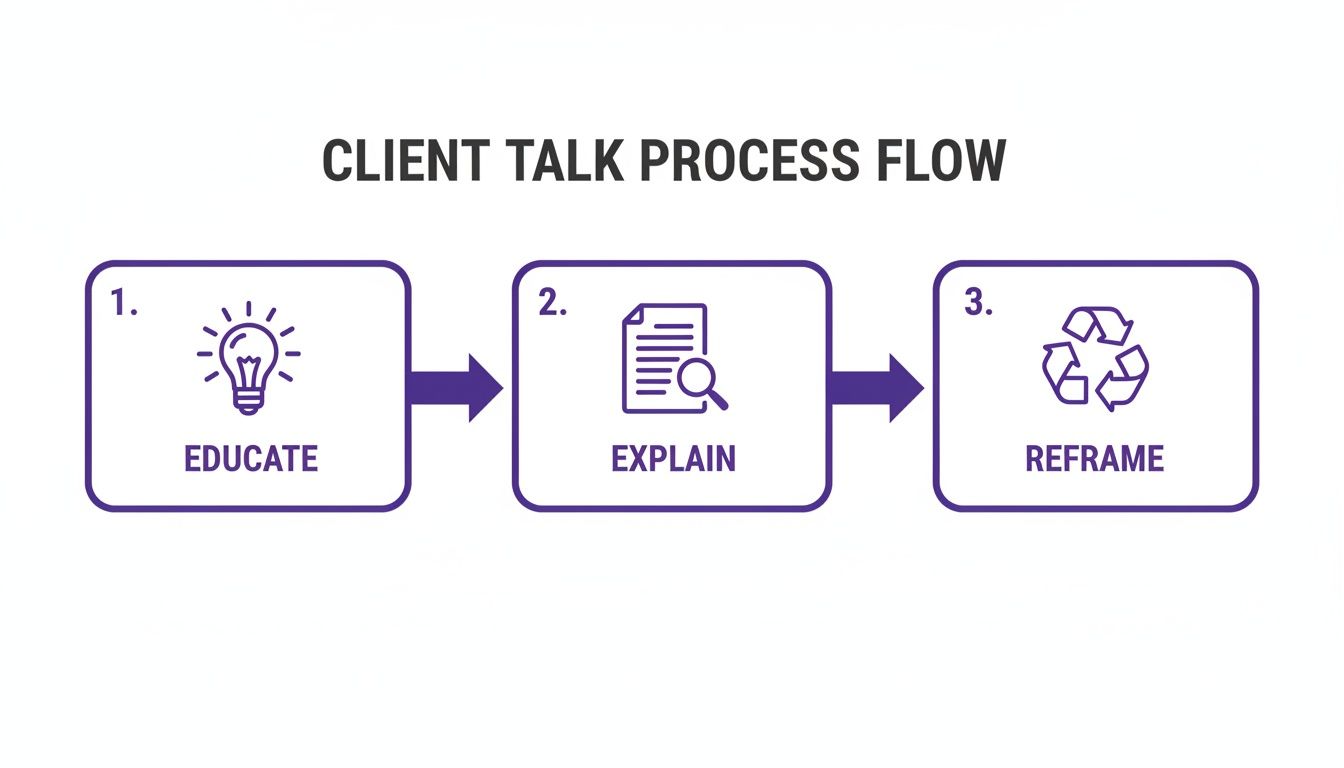
This approach turns a tough "no" into a collaborative "yes, and here’s what that looks like," which keeps the project moving and the client relationship strong.
The Four Pillars of Change Control
Your process doesn't need to be some complicated, bureaucratic nightmare. Simpler is almost always better. It just needs to be consistent and cover these four key steps for every single out-of-scope request, no matter how tiny it seems.
Acknowledge and Document It: The second a client asks for something new, the first step is to listen carefully. Then, immediately write it down. I like to add a new card to a dedicated "Change Requests" list in Trello or Asana. This shows the client you're taking their idea seriously while getting it out of the "verbal agreement" danger zone.
Evaluate the Impact: Now, you need to figure out what it will really take to get this done. This isn't just about the time to build the new feature; you have to account for testing, potential integrations, and any ripple effects it might have on other parts of the site. Be honest about the impact on both the timeline and the budget.
Send a Formal Change Order: Draft a clear, simple document or email. It should spell out the new request, the extra cost, and any changes to the final delivery date. This is the most crucial step—it officially reframes the request as a business decision for the client to make.
Get Written Approval: Do. Not. Start. Work. until you have a clear, written "yes" from the client on that change order. A simple email reply saying "Approved" or "Let's proceed" is all you need. This is your green light and your safety net.
A change control process isn't about creating red tape. It's a transparent system that respects your time and the client's budget, making sure everyone understands the trade-offs before moving forward.
Keep It Simple, Keep It Consistent
Having a clear process also helps with managing competing priorities, which is a constant struggle when new ideas pop up mid-project. It forces everyone to decide what's most important right now.
The real goal is to make this process feel so natural that it just becomes part of how you and your client work together.
Once a change gets the green light, you can slot it into your active workflow with total confidence. A system like this is a cornerstone of a smooth project, almost as important as the final checks you run before taking a site live. In fact, the principles of clear documentation and sign-offs are a lot like what you’d find in a solid website launch checklist.
Using Agile Principles to Keep Your Divi Workflow Flexible
Look, a rock-solid scope and a formal change process are your best defenses against scope creep. We all know that. But let's be real—web design projects need room to breathe. Some of the best ideas pop up mid-project, and if your process is too rigid, you risk stifling that creativity and frustrating your client.
This is where borrowing a few simple ideas from Agile development can be a game-changer, even if you're a solo Divi freelancer. You don't need a massive team or a complicated project management system to make this work.
The core idea is simple: break your big website build into smaller, more manageable chunks. In the Agile world, these are often called "sprints." This approach naturally builds in moments for feedback and course correction, turning the project into more of a collaborative journey and less of a rigid march to a fixed finish line.
Embracing Sprints in Your Divi Projects
Think of a sprint as a mini-project with its own clear goal, typically lasting one or two weeks. Instead of trying to nail down the entire website in one go, you focus on delivering a specific, functional piece of it. It’s a fantastic way to keep things moving while still being open to your client's input.
Here’s how you could break down a typical Divi project into sprints:
- Sprint 1: The Foundation. The goal here is to build and get sign-off on the global elements. This means the header, footer, and the core page layouts (like the Homepage, About, and Contact pages), often using placeholder content.
- Sprint 2: The Functionality. Now you start plugging in the key features. This could be building out the blog post template, setting up the entire WooCommerce shop, or integrating something more advanced like the forms in Divi Areas Pro.
- Sprint 3: The Polish. This final sprint is all about the details—fine-tuning the responsive design, populating the final content, and running through performance optimizations before you push the site live.
At the end of each sprint, you have a scheduled review with your client. This is their dedicated time to give feedback. And if they suggest a new feature? It doesn't send the entire project into a tailspin.
Turning 'No' into 'Not Now'
When a client suggests a new feature during one of these reviews, the sprint approach completely changes the dynamic of the conversation. Instead of hitting them with a hard "no, that's out of scope," it becomes a much more collaborative, "That's a great idea! Let's schedule that for Sprint 4."
This simple shift acknowledges their input and makes them feel heard, all while keeping the current sprint focused and on track. You're not rejecting their idea; you're just slotting it into the plan in a way that doesn't derail the budget or timeline.
This is really the antidote to scope creep. You define what's achievable in the short term, review progress regularly, and defer extra requests to future phases. It fosters collaboration and makes it so much easier to spot potential scope changes before they become major problems. For a deeper dive, Monday.com has some great insights on how Agile helps manage project scope.
An iterative workflow like this transforms new client requests from being project-derailing interruptions into planned, manageable additions. It respects the project's budget and timeline while making the client feel like a valued partner in the process.
Common Questions (And Real Answers) About Scope Creep
Even with a rock-solid process, you're going to run into tricky situations. It's just part of the job. Knowing how to navigate those moments is what separates the pros from the freelancers who get steamrolled. Let's tackle some of the toughest, most common scope creep questions I see pop up on Divi projects.
What if a Client Insists a Request Is “Small” and Refuses to Pay?
Ah, the classic. We’ve all been there. The key is to politely—but firmly—steer the conversation back to the value of your time and the agreement they already signed.
Explain that even "small" changes kick off a whole process on your end to ensure quality. It's not just the 15 minutes of coding; it's the implementation, plus testing across different browsers and devices to make sure the "tiny" change didn't just break their contact form.
Give them two simple paths forward:
- Add the request to a documented "Phase 2" list for later.
- Provide a small, separate quote for the work right now.
Being consistent is your best friend here. It gently reinforces the professional boundaries you established from the get-go.
How Can I Stop Scope Creep Before a Project Even Starts?
Honestly, the best way to handle scope creep is to cut it off at the pass. This battle is won or lost during your very first discovery call. Your mission is to ask deep, clarifying questions that dig up every potential need and hidden expectation a client might have.
Then, you build a proposal so detailed it leaves zero room for misinterpretation.
- List Every Single Deliverable: Be painfully specific about what you’re building.
- Spell Out What's Not Included: Explicitly state exclusions like SEO, content writing, or ongoing maintenance.
- Include a "Change Happens" Clause: Your contract must outline your change control process. This sets the rules of engagement from day one.
A project without a detailed scope is just a paid hobby. The more you clarify upfront, the fewer difficult conversations you’ll have later.
Is It Ever Okay to Do a Small Extra Task for Free?
Yes, but it has to be a strategic move, not an automatic "yes." For a fantastic, long-term client, knocking out a quick task that takes you less than 20 minutes can be a smart investment in that relationship.
The non-negotiable part? You absolutely must document it.
After you do the thing, send a friendly follow-up email. Something like, "Happy to take care of that for you! Just so you know, this would normally follow our change request process, but we've included it as a courtesy this time." This simple email delivers goodwill while ensuring your process doesn't get taken for granted down the road.
Ready to build better, more interactive websites without the headache of scope creep? Divimode provides the tools and training you need. With Divi Areas Pro, you can create advanced popups, fly-ins, and conditional content that will wow your clients. Explore Divi Areas Pro and see how it can upgrade your Divi workflow.
More Articles You Will Like