 Alex Martin
When you boil it down, Divi is a complete design framework for WordPress that bundles a powerful theme and a visual, drag-and-drop page builder into one package. It’s an all-in-one system that lets you build and fine-tune just about any part of your website, often without ever touching a line of code. It’s no surprise it powers millions of websites—it’s one of the most popular tools in the WordPress world for a reason.
A Practical Look at Divi
Think of your WordPress site like a house you're building from the ground up.
In this scenario, the Divi Theme is the architectural blueprint. It sets up the core structure—the global elements that give your entire site a consistent look and feel. We're talking about your site-wide header and footer, default color palettes, and typography styles. The theme is the foundation that ensures every page, from your homepage to your blog posts, feels like it belongs together.
The Divi Builder, on the other hand, is your complete set of interior design tools. It’s the hands-on, visual editor that lets you decorate each room (or page) exactly the way you want. You can drag and drop text, images, videos, contact forms, and dozens of other elements right onto the page and see your changes happen in real time. This is where the creative work happens.
The key thing to grasp is that Divi isn't just a theme or just a builder—it’s a tightly integrated ecosystem. You get the structural control of a theme and the creative freedom of a visual builder, all working together in one seamless package.
How The Two Parts Work Together
The real magic of Divi is how the theme and builder play off each other. You might use the Theme Builder to create a universal template for all your blog posts—setting the header, footer, and sidebar just once. Then, you'd switch to the Visual Builder to write the unique content for each individual article. This approach is a massive time-saver.
To make this distinction crystal clear, let's break it down.
Divi Theme vs Divi Builder at a Glance
This table shows exactly what each component is responsible for, helping you understand where to go when you need to make specific changes to your site.
| Component | Primary Role | Controls |
|---|---|---|
| Divi Theme | The Foundation | Global elements like headers, footers, typography, and color palettes. |
| Divi Builder | The Creative Tool | Page and post content using sections, rows, and modules in a visual editor. |
It's this combination of foundational control and creative flexibility that makes Divi so useful for everyone, from DIY business owners to seasoned web design agencies.
Understanding the Divi Design Ecosystem
To really get your head around what is Divi, it helps to stop thinking of it as one single thing. Instead, picture it as two core parts that work together like a hand in a glove: the Divi Theme and the Divi Builder.
Think of the Divi Theme as your website's operating system. It’s the foundation that controls all the global stuff—the universal header and footer, your site-wide color palette, and the default fonts that keep everything looking consistent. It sets the rules.
The Divi Builder, on the other hand, is the creative software you run on that operating system. This is where you actually design your pages. It gives you the hands-on tools—the sections, rows, and modules—to build out the unique content for each page.
This diagram lays it out perfectly. You can see how the Theme creates the big-picture structure for the entire site, while the Builder operates inside that framework to craft individual page layouts.
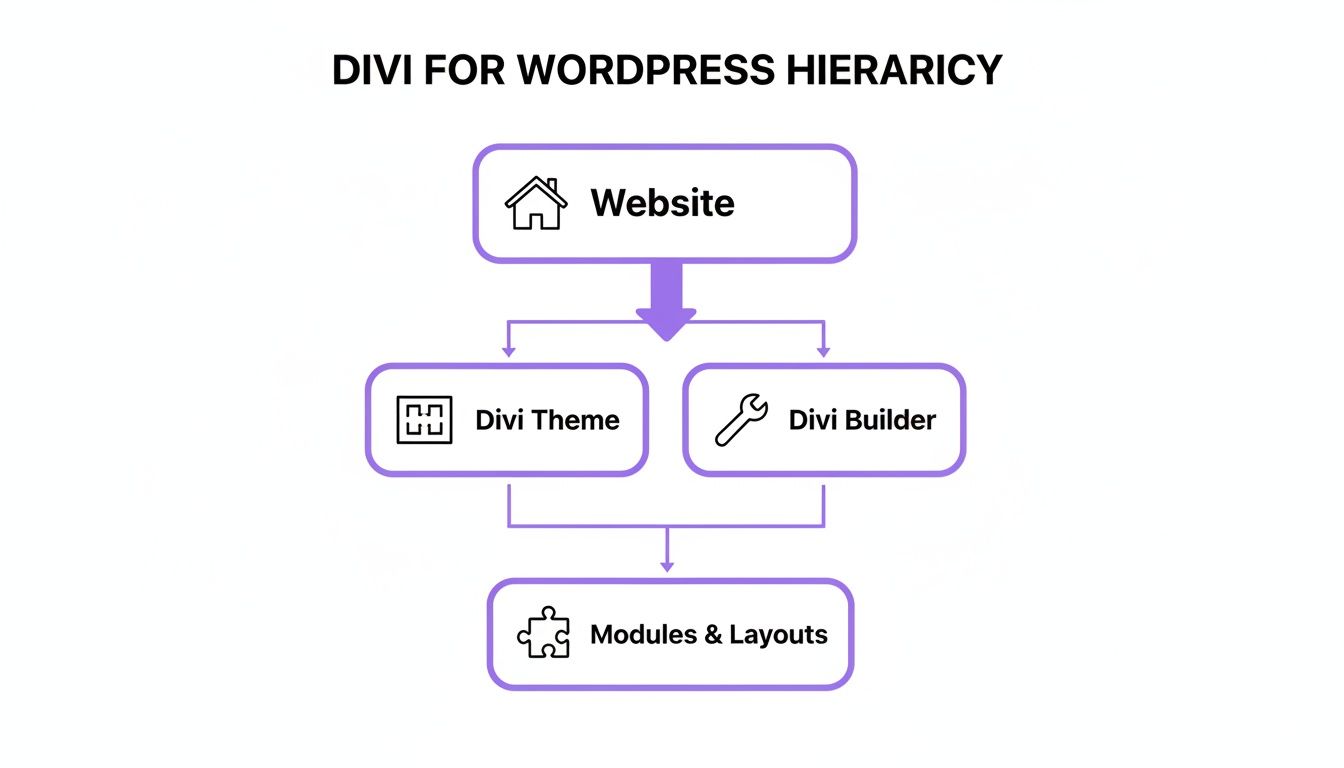
Essentially, every element you add with the Builder automatically follows the global styles you defined in the Theme. This is how you maintain a cohesive, professional look without having to style every single button or text block from scratch.
The Building Blocks of a Divi Page
When you jump into the Divi Builder, you're basically playing with digital Lego bricks. Everything you create on a page is organized using three simple but incredibly powerful elements:
- Sections: These are the biggest containers on the page, the ones with the blue border in the editor. Think of them as the main horizontal blocks, like your hero area at the top or a dedicated contact section at the bottom.
- Rows: Nestled inside each section, you'll find rows (with green borders). Rows are all about creating a column structure. Need a two-column layout for a service list or a four-column grid for a portfolio? Rows are how you do it.
- Modules: Finally, you have the modules themselves (gray borders). These are the actual content pieces you drop into your columns—a block of text, an image, a video, a contact form, you name it.
This Section > Row > Module structure is the fundamental grammar of Divi. Once you master this simple hierarchy, you have total control. You can build anything from a straightforward blog post to a complex, multi-layered landing page with absolute precision.
This system is what you see in action in the Divi Visual Builder, with those colorful borders clearly marking out each element.
That immediate visual feedback is a game-changer. You can click directly on any piece of content and start tweaking its style in real-time. If you want to go deeper on its features, you can explore more about the Divi page builder right here. This "what-you-see-is-what-you-get" experience is a huge reason why so many people find Divi so intuitive and easy to pick up.
Exploring the Features That Define Divi
Beyond the theme-versus-builder discussion, the real magic of Divi is in the toolkit that comes built right in. These aren't just tacked-on extras; they're deeply integrated features designed to make your workflow smoother and turn complicated design tasks into simple, visual actions.
The star of the show is Divi’s intuitive visual builder. It completely changes the game when it comes to creating great web content, especially for those who aren’t professional coders or writers.
This is a true "what you see is what you get" live editor. When you change a color, tweak a font size, or adjust spacing, you see it happen instantly on the front end of your site. It kills the old, clunky workflow of "edit, save, refresh" and replaces it with a fluid, immediate design experience.
The Power of the Divi Library
One of the biggest time-savers in the Divi ecosystem is the Divi Library. Let's say you've just crafted the perfect testimonial section—the layout, styling, and animations are spot-on. Instead of having to rebuild it from scratch on another page, you can save it to your library with a single click.
That saved layout can then be dropped onto any other page on your website in seconds. But it gets even better. You can designate any saved element as a "Global Item". When you edit a global item in one spot, that change instantly applies everywhere else it’s used across your site. It’s a lifesaver for things like call-to-action buttons or contact forms that need to stay consistent.
The Divi Library transforms your best designs from one-off creations into reusable assets. It’s a core feature for maintaining brand consistency and dramatically speeding up development time, especially for agencies managing multiple client sites.
Full Site Control with the Theme Builder
While the Visual Builder is your go-to for individual pages, the Theme Builder is where you gain control over your entire website's structure. This is what elevates Divi from a simple page builder to a full-blown website-building framework. It lets you design custom templates for parts of your site that are normally locked down.
With the Theme Builder, you can create:
- Custom Headers and Footers: Design a unique global header that appears everywhere, or create a special one just for your blog posts.
- Post and Product Templates: Build a custom layout for all your blog articles or WooCommerce products, giving them a unique and branded look.
- Archive Page Designs: Finally, you can customize how your category pages, search results, and author pages are displayed.
For instance, you could design a blog post template that automatically pulls in the post title, featured image, and author bio into a stylish, pre-designed layout. Every new post you write will automatically adopt this structure, saving you from repetitive work. It’s this level of control that makes Divi a complete solution, not just a page editor.
Who Should Use Divi and Why
Divi’s real power isn’t in a single feature but in its incredible versatility. It’s not a one-size-fits-all tool; instead, it flexes and adapts to what different creators actually need, making it a powerful ally for a whole range of people. Once you see the core ways it’s used, you’ll know if it’s the right fit for your projects.
From solo entrepreneurs building their first site to large creative teams juggling multiple clients, Divi offers something for everyone.
Freelancers and Design Agencies
For any freelancer or agency, time is money. This is where Divi becomes an efficiency powerhouse. Its visual, drag-and-drop interface and reusable library elements let you achieve rapid development, slashing the time it takes to turn a blank page into a polished client website. Plus, features like white-labeling allow you to brand the WordPress dashboard, giving clients a professional and seamless handoff.
This kind of streamlined workflow means you can handle more projects without ever cutting corners on quality. The ability to save and export entire designs lets you build up a personal toolkit of your best layouts, templates, and sections, making every future build that much faster.
Small Business Owners
For small business owners, Divi is flat-out empowering. It tears down the technical walls that often stand between you and your own online presence. You no longer have to call a developer for every tiny text change or image swap.
Divi gives business owners the freedom to update their own homepage, publish a new service page, or spin up a landing page for a new marketing campaign—all on their own. This direct control doesn't just save money; it gives you the agility to move quickly in a fast-paced market.
This hands-on control is a huge reason why so many companies are discovering the advantages of Divi for business. It puts essential marketing tools right where they belong: in your hands. Your website becomes a living, breathing asset instead of a static, outdated brochure.
Bloggers and Content Creators
Bloggers and content creators often feel boxed in by the rigid post layouts of standard WordPress themes. Divi’s Theme Builder completely changes the game. It unlocks the ability to design totally custom blog post templates that can grab and hold a reader's attention.
Forget boring, single-column posts. You can create unique, magazine-style layouts with dynamic content elements to build articles that truly stand out. This level of design freedom helps you craft a memorable reading experience, encouraging visitors to stick around longer and connect more deeply with your content.
In the end, whether you're a freelancer building for clients or a business owner managing your own site, performance is everything. For those who want to get the most out of their Divi site without the technical headaches, looking into the best managed hosting for WordPress can be a smart move. It streamlines the management side of things and ensures your creation runs smoothly. Divi gives you the creative tools, and great hosting provides the solid foundation.
Expanding Your Site with Divi Integrations
A great design tool doesn't exist in a bubble; it shines by plugging into a wider ecosystem. Divi gets this right, playing nicely with the essential WordPress plugins you’re probably already using. For example, it integrates seamlessly with WooCommerce to build powerful online stores and MemberPress to create exclusive membership sites.
This built-in compatibility is a massive head start. But the real magic happens when you tap into the third-party Divi marketplace. It's a buzzing hub where talented developers create specialized add-ons that solve very specific problems, pushing Divi far beyond what it can do out of the box.
These plugins aren't just minor tweaks. They often introduce entirely new features that can fundamentally change how you build websites and what you can offer your visitors.
Unlocking New Possibilities with Addons
Think of third-party plugins as specialty toolkits for your Divi workshop. While the core builder gives you a fantastic set of general-purpose tools, these add-ons are the precision instruments you need for more advanced jobs. They fill in the gaps and open up whole new creative avenues.
Our own plugins at Divimode are a perfect example. Divi Areas Pro lets you create sophisticated popups, dynamic fly-ins, and conditional content hooks that just aren't possible with the standard builder. This is where a website stops being a simple brochure and starts becoming an interactive, personalized experience engine.
With the right integrations, your Divi site evolves from a static digital brochure into a dynamic marketing machine. You can tailor content, capture leads, and guide user journeys with a level of precision that drives real results.
For instance, you could use a plugin like Divi Areas Pro to show a special discount popup only to visitors who are about to leave your online store without buying anything. This is known as exit-intent technology, and it’s a powerful way to recover sales you might have otherwise lost—a feature made possible by a specialized Divi integration.
Choosing the Right Extensions
With so many options out there, finding the right add-on is key. The goal is to solve a specific problem without bogging down your website with a bunch of unnecessary code. Start by identifying what you actually need. Are you looking for better popups, advanced forms, or maybe a unique menu style?
Once you have a clear goal, you can explore the marketplace for well-supported and highly-rated solutions. To help you get started, we've put together a list of the best third-party Divi plugins that can seriously elevate your website's functionality.
Ultimately, integrations are what allow you to say "yes" to more complex client requests and ambitious design ideas. They extend Divi's power, making sure the platform grows right alongside your skills and goals. By smartly combining Divi’s core strengths with targeted plugins, you can build a site that isn't just beautiful—it's incredibly effective.
Facing Divi Limitations and Common Myths
Let's be real: no tool is perfect. A truly honest look at Divi means we have to talk about its potential downsides and bust some myths that just won't seem to go away. Getting a balanced view helps you decide if it's really the right fit for your projects.
One of the oldest criticisms you'll hear is “shortcode lock-in.” The fear was that if you ever switched away from Divi, your pages would turn into an ugly mess of unreadable shortcodes. And for a while, that was a legitimate concern. But Elegant Themes tackled this head-on and released a feature that cleans everything up, leaving you with clean HTML and all your content intact.
Another myth that constantly pops up is about performance. Can a Divi site be slow? You bet. Throw it on cheap, low-quality hosting and don’t optimize anything, and it’ll crawl. But these days, Divi comes loaded with a powerful suite of built-in performance tools.
Debunking Common Misconceptions
When you actually use these features correctly, Divi can power some seriously fast websites. Here’s what you need to remember:
- Hosting Matters: Don't skimp here. A high-quality hosting environment is the foundation of a fast Divi site. It's not optional.
- Built-in Optimizations: Divi can handle the heavy lifting for you. It can minify and combine code, defer CSS, and optimize Google Fonts right out of the box.
- Image Optimization: This one is universal. You have to compress your images properly, no matter what theme or builder you’re using.
The whole "Divi is slow" argument is an outdated myth. With modern performance settings and some basic site management, Divi sites easily hit excellent speed scores and deliver a great user experience.
Finally, there’s the idea that Divi is only for beginners. Yes, the visual interface is incredibly easy to pick up, which is a huge plus. But beneath that user-friendly surface is a deep and flexible framework. Plenty of advanced developers use Divi as a starting point for highly complex, custom-coded projects. They lean on its solid foundation and then build on top of it with their own code.
It's a tool that grows with you. The ceiling for what you can build is much higher than most people think.
Frequently Asked Questions About Divi
Even after diving into the features, it's normal to have a few questions floating around. Let's tackle some of the most common ones people ask when they're thinking about using Divi for a project.
Is Divi a Theme or a Plugin
This is a great question because the answer is: it’s both! This flexibility is one of its biggest strengths.
Most people will use the Divi Theme, which is the all-in-one package. It bundles the theme itself with the powerful Divi Builder, ensuring everything works together perfectly right out of the box. For 99% of projects, this is the way to go.
But what if you love another theme and just want Divi’s design tools? No problem. You can get the Divi Builder as a standalone plugin. This lets you use its drag-and-drop magic on top of any other WordPress theme, giving you incredible creative freedom no matter what foundation your site is built on.
Do I Need to Know Code to Use Divi
Absolutely not. The whole point of Divi is to empower people who don't code. Its visual, drag-and-drop interface is its biggest selling point, letting you build incredible websites from the ground up without ever touching a line of code. From crafting your layout to tweaking the smallest design detail, it's all handled with intuitive visual controls.
That said, Divi doesn't lock out developers. For those who want to get their hands dirty, Divi gives you full access to add custom CSS to any element, section, or even the entire page. This makes it a fantastic tool for everyone, from total beginners to seasoned pros who need that extra layer of control.
The beauty of Divi is that it meets you where you are. It’s simple enough for a beginner to launch a site quickly but deep enough for a developer to build complex, custom solutions.
Will Divi Make My Website Slow
This is a common myth, usually based on much older versions of the builder. Let's be real: any powerful tool can slow down a site if it's not used correctly. However, modern Divi is built with speed in mind and comes packed with a whole suite of performance tools.
These features are built right in, automatically minifying code, combining stylesheets, and deferring scripts to make sure your pages load as quickly as possible. When you combine these built-in optimizations with good quality hosting and some basic image compression, Divi sites can be incredibly fast and score high on tools like Google PageSpeed Insights.
Ready to unlock dynamic popups, conditional content, and interactive elements on your Divi site? Explore how Divimode can take your designs to the next level. Learn more about our powerful plugins at divimode.com.
More Articles You Will Like