
 Alex Martin
Getting cookie consent for WordPress right is one of those foundational things you just can't skip. It’s all about showing a clear notice to your visitors, letting them know what cookies your site uses, and—most importantly—getting their permission before you drop any non-essential trackers on their browser. This isn't just a suggestion anymore; it's a hard requirement under most modern privacy laws.
Why WordPress Cookie Consent Is a Non-Negotiable

This image nails the current vibe of the internet: privacy first. Properly handling cookie consent isn't some optional checkbox you tick off. It's now a critical piece of responsible website management and a core part of modern web standards.
Honestly, this has moved way beyond a simple legal formality. It's now a cornerstone of user trust and a direct reflection of your site's reputation. When a visitor lands on your page and sees a clear, honest consent banner, it sends an immediate signal that you respect their privacy. That positive first impression goes a long way.
The whole push for cookie consent is rooted in legal frameworks that demand a solid and transparent fundamental privacy policy on your site. Regulations like the General Data Protection Regulation (GDPR) in Europe and the California Consumer Privacy Act (CCPA) have completely changed the game for how websites handle user data. They come with strict rules and some pretty hefty penalties for anyone who doesn't play along. If you want to dive deeper, we have a detailed guide on the key differences between GDPR and CCPA.
The Real-World Impact of Non-Compliance
Trying to ignore these regulations can get expensive, fast. We've seen major brands get hit with massive fines for failing to get valid user consent, making this a very real business risk. This isn't about fear-mongering; it's about recognizing that the web has shifted to a privacy-first model where transparency isn't just expected—it's legally required.
Your approach to cookie consent directly reflects your brand's commitment to user privacy. Getting it right builds trust, while getting it wrong can lead to legal trouble and damage your reputation beyond repair.
Shockingly, compliance is still a massive challenge for many. A study found that only 15% of the top 10,000 websites across 31 countries are fully compliant, even though 67% show some kind of consent banner. Common mistakes? Things like pre-ticked boxes for non-essential cookies or making it a hassle to reject cookies—practices that have already drawn formal warnings from data protection authorities.
Future-Proofing Your Marketing Efforts
Here's another angle: as major browsers continue to phase out third-party cookies, the first-party data you collect with clear, explicit consent becomes marketing gold. This is data you gather directly from your audience, which makes it far more accurate and reliable.
Building a compliant framework for cookie consent for WordPress right now is really an investment in your future. It ensures you can continue to:
- Gather valuable analytics: Understand user behavior with tools like Google Analytics, but in a way that’s ethical and respects privacy.
- Personalize user experiences: Serve up relevant content and offers based on data you have permission to use.
- Maintain legal standing: Steer clear of fines and build a brand that customers feel safe sharing their information with.
At the end of the day, getting a handle on cookie consent protects your business, shows respect for your users, and gets your website ready for the next chapter of the internet.
Choosing the Right Cookie Consent Plugin for Your Site
Picking a tool for cookie consent for WordPress can feel like digging through a bargain bin hoping to find a gem. There are hundreds of options out there, but the real trick is to look past the flashy marketing and zero in on what actually matters for compliance and user experience. The plugin you choose has a direct impact on your site's legal footing and its performance.
There are a few non-negotiables. First and foremost is automatic script blocking. Any serious consent plugin must stop analytics, marketing, and other non-essential scripts from firing before a user explicitly says it's okay. If your plugin just slaps a banner on the screen but doesn’t actually control the scripts, it’s not doing its job. It's just for show.
Another must-have is solid integration with Google Consent Mode v2. This is the tech that lets your site tell Google services what your visitors have consented to. It's absolutely essential for getting back some anonymized analytics data from users who decline cookies, which means you can still get valuable insights without stepping on anyone's privacy.
Key Features to Look For
When you're comparing plugins, you'll start to see a clear line between the basic banner tools and the true consent management platforms (CMPs). Here’s what separates them:
- Robust Consent Logging: If an auditor ever comes knocking, you'll need proof. A good plugin keeps a secure, timestamped log of every user's consent choice, making it dead simple to show you’re compliant.
- Granular Cookie Categorization: The banner shouldn't be an all-or-nothing choice. It needs to let users opt into specific cookie categories, like 'Analytics' or 'Marketing'. This respects their choices and is a hard requirement under laws like GDPR.
- Geo-Targeting Functionality: Privacy rules are different all over the world. A smart plugin knows this and will automatically show the right kind of banner—like a strict GDPR opt-in for folks in the EU and a CCPA opt-out for visitors from California—all based on their location.
The sheer popularity of some tools shows just how seriously people are taking this. The Cookie Notice & Consent plugin, for example, is running on a whopping 60,836,597 live websites. That kind of number tells you there's a massive need for a dedicated cookie consent for WordPress solution in an ecosystem that powers over 40% of the entire web. You can see the market share data for yourself.
Comparing the Top Contenders
What works for a small personal blog probably won't cut it for a global e-commerce powerhouse. Performance is a huge deal here; a clunky, poorly coded plugin can drag your site's speed down, which hurts both your SEO and your visitors' patience. And of course, it has to be easy to use. The last thing you need is a tool that requires a developer just to change some banner text.
A great cookie consent plugin should feel like a natural extension of your WordPress dashboard—powerful under the hood but intuitive on the surface. It should simplify compliance, not add another layer of complexity to your workflow.
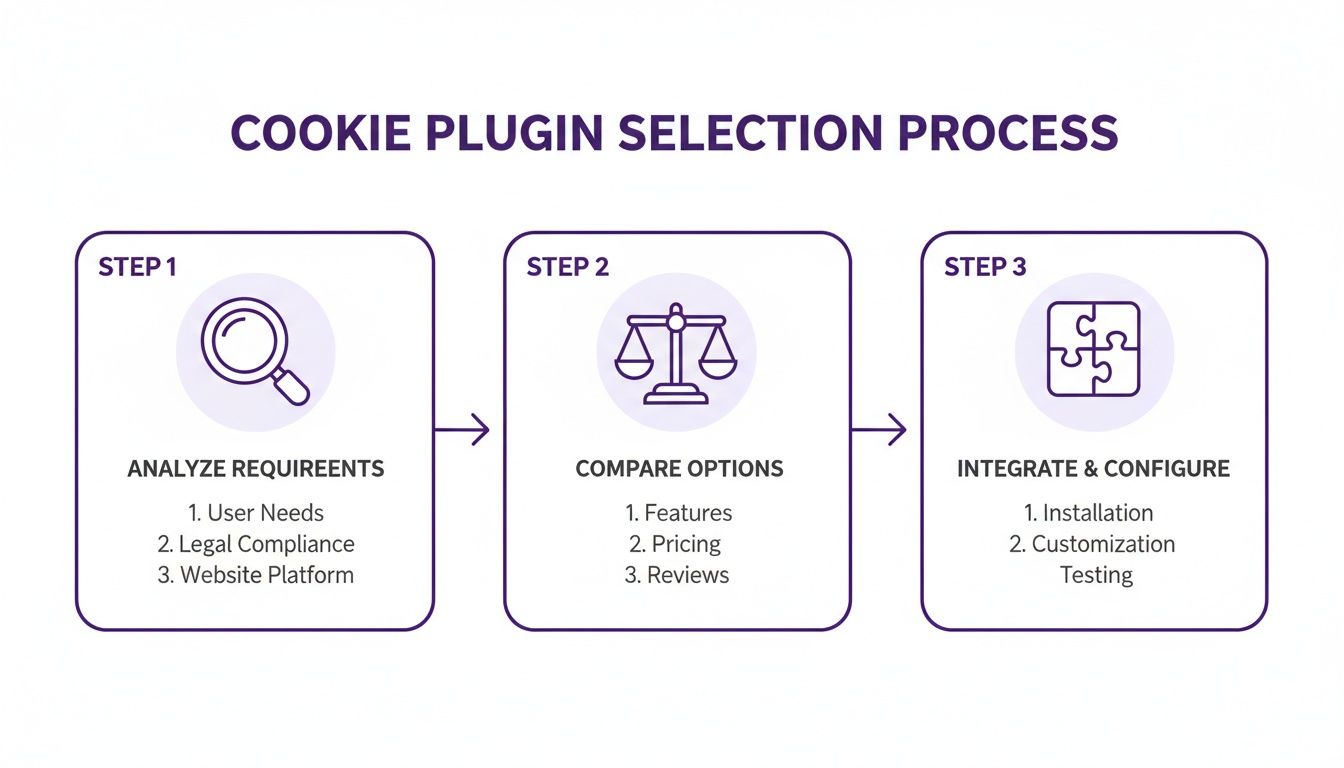
To help you choose the right tool for the job, we've broken down some of the leading options available. A direct comparison can really simplify the decision-making process.
Feature Comparison of Top WordPress Cookie Consent Plugins
To make things easier, this table breaks down the key features of the top consent management plugins. It's designed to give you a quick, at-a-glance view to help you find the best fit for your WordPress site's needs.
| Feature | Plugin A (e.g., CookieYes) | Plugin B (e.g., Complianz) | Plugin C (e.g., Cookiebot) |
|---|---|---|---|
| Automatic Script Blocking | Yes, via auto-scan | Yes, with script center | Yes, via auto-scan |
| Google Consent Mode v2 | Fully supported | Fully supported | Fully supported |
| Consent Logging | Yes, detailed logs available | Yes, with proof of consent | Yes, with secure logging |
| Geo-Targeting | Yes, based on user location | Yes, for GDPR, CCPA, etc. | Yes, region-specific banners |
| Customization | High (colors, fonts, layout) | Moderate (templates available) | High (fully brandable) |
| Free Version Available | Yes, with limitations | Yes (limited features) | Yes, for small sites |
Ultimately, the goal is to find a plugin that not only keeps you compliant but also fits seamlessly into your workflow without slowing you down.
For a much deeper dive, check out our complete guide on the best cookie plugins for WordPress compared. We get into the nitty-gritty of performance impact, customization options, and overall value to help you find the perfect match for your site's specific legal and operational needs.
Configuring Your Banner for Compliance and User Experience
Once you've picked a plugin, the real work begins. Getting your cookie consent for WordPress right is more than just flipping a switch; it’s about a thoughtful setup that balances legal must-haves with a smooth user journey. A clunky, confusing banner can frustrate visitors and tank your site’s performance.
Let's be clear: this isn't just about avoiding fines. The design and feel of your cookie banner can have a real impact on how people behave on your site and even improve website conversion rate. The goal is to make compliance feel like a natural part of your site, not an annoying roadblock.
Geo-Targeting Your Consent Notices
One of the smartest features in modern consent plugins is geo-targeting. This lets you show different banners depending on where your visitor is coming from, which is a game-changer for global compliance. You don't need to force a strict GDPR-style banner on someone in a region with more relaxed laws.
For example, you can set things up to:
- Show a detailed, opt-in banner for users in the EU, asking for explicit consent for each type of cookie.
- Display a simpler notice with an "Accept" button and a "Do Not Sell My Information" link for visitors from California, which aligns with CCPA.
- Present a basic informational banner for everyone else where the laws are less specific.
This targeted approach not only respects the different legal rules but also gives every user a much better, more relevant experience. It stops you from applying the strictest rules to your entire audience, which can help keep your acceptance rates up where it's allowed.
Categorizing Cookies and Blocking Scripts
A compliant banner needs more than a big "Accept All" button. It has to give users real, granular control, and that starts with categorizing every single cookie your WordPress site uses. Most good plugins will scan your site and automatically sort cookies into buckets like Necessary, Functional, Analytics, and Marketing.
Your job is to double-check that list and make sure it’s spot on. But the most crucial step is to confirm your plugin is set up to actually block scripts from running until a user gives their consent. Your Google Analytics or Facebook Pixel scripts, for instance, should not fire until someone explicitly opts into the "Analytics" or "Marketing" categories.
A classic mistake is to set up a banner that just tells users about cookies without actually controlling them. Real compliance means nothing non-essential loads without permission. You absolutely have to test this to make sure it's working as expected.
This is what turns your banner from a simple notification into a true consent management tool.
Designing a User-Friendly Banner
Finally, let’s talk about design and copy. You need to stay away from confusing legal jargon and "dark patterns"—those sneaky design tricks that nudge users into accepting cookies, like making the 'Reject' button hard to find or using misleading colors.
Your banner should look and feel like it belongs on your site, using your brand's colors and fonts. The language needs to be simple and direct. Explain why you use cookies in plain English. This builds trust, encourages people to make an informed choice, and ultimately strengthens your site's credibility.
Advanced Integration with Divi and Divi Areas Pro
If you're one of the millions running a site on the Divi theme, you know that a generic, one-size-fits-all banner just won't cut it. The whole point of Divi is total visual control, and your approach to cookie consent for WordPress should be no different. Don't settle for a generic look; use Divi's design tools to style your consent banner to perfectly match your site’s branding, fonts, and color palette.
When the consent notice feels like a deliberate part of your design, it’s not just a clunky script tacked on as an afterthought. A well-integrated banner is far less jarring for visitors, which often leads to them actually engaging with the options you're providing instead of just clicking away.
Elevating Consent with Divi Areas Pro
Styling a default banner is a solid start, but you can create a far more dynamic and user-friendly experience with Divi Areas Pro. This is where things get really interesting. This powerful plugin lets you ditch the static bottom-of-the-page banner and build completely custom popups, fly-ins, or slide-ins using the Divi Builder you already know and love.
This opens up a ton of possibilities. For instance, you could design a clean, unobtrusive popup that only appears after a user has been on the page for a few seconds. Or, maybe a subtle fly-in that slides into view from the corner, giving consent options without blocking the main content. This level of control is how you strike the perfect balance between compliance and a premium user experience. To see what’s possible, you can learn more about how to display content using Divi Areas Pro and apply those same techniques to your consent notices.

This is the Divi Builder interface you'll be working with. It's the same visual, drag-and-drop system you use for your pages, now applied to crafting a consent popup that is perfectly aligned with your site's aesthetic.
Connecting Custom Buttons to Consent Actions
Now for the magic. The real power comes from connecting your custom-designed Divi buttons to the backend logic of your consent plugin. Most top-tier consent management platforms (CMPs) provide specific JavaScript functions or, more commonly, CSS classes that you can assign to elements to trigger consent actions.
Here’s how that workflow usually looks in practice:
- Build Your Popup: First, design your consent notice in a Divi Area. Create your "Accept," "Reject," and "Settings" buttons using the standard Divi Button module.
- Find the Triggers: Dig into your CMP’s settings or documentation to find the specific CSS classes or IDs used for consent actions. They'll look something like
cmplz-acceptorcookieyes-reject-all. - Assign the Triggers: Head back to the Divi Builder. Open the settings for your "Accept" button, click the Advanced tab, and paste the corresponding class into the CSS Class field.
- Repeat for Other Actions: Do the same thing for your "Reject" and "Settings" buttons, making sure each one is linked to the correct class provided by your consent plugin.
By linking Divi elements to your CMP’s functions, you ensure that every click is accurately recorded in your consent log. This method gives you the best of both worlds: complete design freedom with Divi and the robust, audit-ready compliance of a dedicated consent plugin.
How to Validate Your Setup and Stay Audit-Ready
Thinking you can just ‘set it and forget it’ is one of the biggest mistakes you can make with cookie consent for WordPress. Your job isn't done until you've personally confirmed the setup works exactly as it should. This final quality check is what separates a truly compliant website from one that just looks the part.
Simply put, you have to verify that your site isn't dropping non-essential cookies on a user's browser before they give you explicit permission. You can't just assume your plugin is handling this perfectly; you need to see it with your own eyes. Thankfully, you don't need any fancy or expensive tools—your web browser has everything you need built right in.
Using Browser Developer Tools for a Quick Audit
The most direct way to check your work is with the developer tools in Chrome, Firefox, or Safari. This lets you peek behind the curtain and see exactly what your site is doing. It might sound a bit technical, but the process is surprisingly simple and gives you undeniable proof.
Here’s an effective testing process you can follow right now:
- Open an Incognito or Private Window. This is crucial. It makes you a brand-new visitor with no prior consent history or cookies saved.
- Launch the Developer Tools. Just right-click anywhere on your site and select "Inspect." This will pop open a new panel.
- Find the Cookie Storage. Look for a tab called "Application" (in Chrome) or "Storage" (in Firefox). Inside, you’ll see a section for "Cookies."
- Check Before You Click. With the cookie storage panel open, look at what’s there before you touch the consent banner. You should only see cookies that are strictly necessary for the site to function. If you see anything from Google Analytics, Facebook, or other marketing tools, your script blocking is broken.
- Give Consent and Check Again. Now, click "Accept" on your banner. Watch the cookie list. It should immediately populate with the trackers you just approved. This confirms your consent tool is firing the scripts correctly.
This five-step check is your first line of defense. It gives you a clear, real-time picture of whether your setup is actually respecting your visitors' choices.
The Importance of a Detailed Consent Log
While browser testing confirms your setup is working right now, a consent log proves it over time. Think of it as your compliance insurance policy. If a data protection authority ever comes knocking, this log is your primary evidence that you obtained valid consent from a specific user at a specific time.
A consent log is non-negotiable for being audit-ready. It's the documented proof that turns your compliance efforts from a claim into a verifiable fact, giving you an essential layer of legal protection.
Most premium consent management plugins handle this for you automatically. They securely store anonymized records of every single consent interaction—what the user chose, a timestamp, and the specific cookie categories they agreed to. Don't just enable this feature; make it a habit to review it in your plugin’s dashboard. Knowing where to find this data is a key part of maintaining an audit-ready cookie consent for WordPress strategy.
Got Questions About WordPress Cookie Consent?
Diving into cookie consent for WordPress can feel like wading through legal jargon and technical "what-ifs." It's a common headache, so let's clear the air on some of the questions I hear most often from site owners.
A big one I see all the time is the belief that if you're not running ads, you don't need a cookie banner. This is a huge, and potentially expensive, misunderstanding. The need for consent goes way beyond just advertising trackers.
Think about it: does your WordPress site use Google Analytics? Do you embed YouTube videos? Have social media sharing buttons? All of these tools are almost certainly setting non-essential cookies. Under regulations like GDPR, you have to get explicit permission from your visitors before any of these scripts load. The only cookies that get a free pass are the ones "strictly necessary" for your site's basic functions, like remembering what's in a shopping cart.
Will a Cookie Banner Tank My SEO?
This is a valid concern, but here's the short answer: a properly implemented cookie banner shouldn't hurt your SEO rankings one bit. Search engines know these banners are a legal requirement.
The real danger comes from a poorly configured banner that messes with your user experience. That can absolutely harm the metrics Google watches, like your bounce rate or how long people stick around.
To keep your SEO safe, stick to these best practices:
- Pick a lightweight plugin. You don't want your consent tool slowing down your site.
- Stop layout shift. Make sure the banner doesn't shove your content around while the page is loading. This is a big deal for Core Web Vitals.
- Keep it mobile-friendly. It needs to be simple to use on a small screen.
Here's the bigger SEO risk: it's not the banner itself, but losing analytics data from people who decline cookies. That's why integrating with Google Consent Mode v2 is so important. It helps you recover some of that anonymized data, so you aren't flying blind.
GDPR vs. CCPA: What's the Difference?
It’s also critical to know that not all privacy laws are built the same. The two heavyweights, GDPR and CCPA, have completely different approaches to consent.
The main difference is the default setting.
GDPR, which covers users in the European Union, is an 'opt-in' system. This means you can't set any non-essential cookies until someone actively clicks "Accept."
CCPA, for California residents, works on an 'opt-out' model. You can set cookies by default, but you must give users a clear way to say "no," usually with a "Do Not Sell or Share My Personal Information" link. A good consent plugin will figure out where the visitor is from and show them the right banner automatically.
At Divimode, we build tools that empower you to create beautiful, interactive, and compliant websites. Elevate your user experience with Divi Areas Pro, the ultimate solution for building custom popups, fly-ins, and other dynamic content with the Divi Builder you already love.
More Articles You Will Like